By Cassandra Balentine
Wide format print providers face profit potential with expansion into laser engraving and cutting.
“By integrating laser technology with existing design and print capabilities, print service providers (PSPs) can offer high-value products like custom signage, packaging prototypes, and point of sale displays. This not only enhances their service offerings but also opens doors to new markets such as interior design, promotional goods, and industrial labeling,” explains Corey Kelly, marketing manager, Trotec Laser.
Elisha Spector, sales manager, leadership team, Engraving Machines Plus, Corp DBA Aeon Laser USA, points out that wide format PSPs are already in the business of bringing creative visions to life, and adding a laser opens up a range of new applications without requiring a major shift in workflow. “Lasers allow them to move into dimensional signage, engraved promotional products, display components, packaging prototypes, and custom décor, all of which complement what they already do. It’s a natural extension that adds both value and versatility to their business.”
Devin Huang, deputy manager, marketing department, GCC America, Inc., admits that while many finished products typically do not require additional laser processing, introducing a laser engraver opens up a broader range of applications and materials that printing alone cannot cover.
“Laser systems complement wide format print perfectly. They allow shops to expand from flat signage into dimensional products—like cut-to-shape acrylic signage, stencils, branding plates, personalized décor, and promotional products. It gives printers the ability to say ‘yes’ to more jobs without outsourcing,” agrees Carole Scott, co-owner, Rabbit Laser USA.
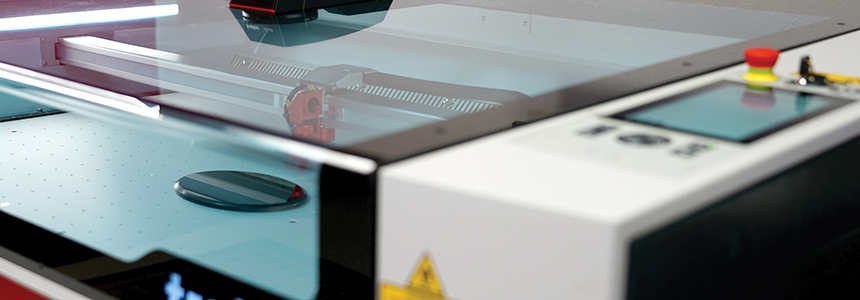
Above: Trotec Speedy laser systems offer a powerful solution for print providers looking to expand into laser finishing. Paired with Ruby software, users get an intuitive, all-in-one platform for design, job setup, and production.
Personalized Possibilities
As noted, a primary benefit of laser technology is the ability to easily customize products.
“In terms of personalization, the laser engraver provides a massive advantage,” admits Huang. “It allows print shops to attract new business opportunities, such as rubber stamps, wooden coasters, engraved tumblers, personalized photo puzzles, and many other customized items that go beyond standard print jobs. This expands the service portfolio and allows for higher profit margins on customized, high-value items.”
“Personalization significantly increases product value and customer engagement,” offers Kelly. Trotec Ruby software supports direct integration from web shops, enabling seamless order-to-production workflows.
Spector sees personalization as one of the fastest growing segments in print and design, and laser engravers make it easy to offer customization. “Whether it’s names, serial numbers, photos, or intricate artwork, a laser engraver can handle detailed and repeatable results on virtually any material. This gives print providers the ability to add premium personalization options to their existing offerings, increasing margins and customer loyalty.”
Scott agrees, noting that personalization is one of the biggest growth drivers in the print industry. “A laser can engrave names, serial numbers, event branding, quick response (QR) codes—anything a customer wants to make unique. For a print provider already working with strong customer relationships, adding personalization is a natural revenue builder.”
How to Start
There are a couple of ways to get into the laser engraving and cutting space. PSPs can start with a small footprint, dedicated laser engraving/cutting solution or purchase add-on modules to existing router/cutter equipment. Here we focus on the former, dedicated laser engraver and cutting solutions.
In many cases, the consensus is that starting fresh with a dedicated laser is the most cost-effective and streamlined approach. “Lasers are optimized for clean, precise cutting and engraving—especially on acrylic and wood. Routers have their place, but they struggle with the fine detail that lasers handle effortlessly,” shares Scott.
Kelly also feels that starting with a dedicated laser system is often more efficient and cost effective than retrofitting existing router systems. “Laser systems are optimized for precision, speed, and ease of use, and they eliminate the mechanical wear and complexity of routers.”
Spector agrees, adding that while some routers can add laser modules, “they don’t deliver the same precision, speed, or versatility as a true CO2 laser.”
A standalone system like the Aeon Laser Mira or Nova series is purpose built for laser applications, making setup and operation simpler and more intuitive, especially for teams that are new to laser technology, according to Spector.
“While adding a laser module to existing equipment may seem easier at first, this approach often comes with trade-offs in functionality, quality, and throughput,” cautions Huang. “For PSPs seeking seamless integration and a fast learning curve, a dedicated standalone laser system typically offers greater long-term benefits in terms of performance, reliability, and operational efficiency.”
For example, the GCC LaserPro lineup includes a range of laser solutions—including desktop and large format systems, CO2, fiber, and dual-source models—designed to meet diverse production needs. “These dedicated machines are user friendly, require minimal maintenance, and deliver consistent professional-grade results for long-term business growth,” shares Huang.
Learning Curve
Laser engravers are designed to be user friendly.
According to Spector, the learning curve for a dedicated laser is “surprisingly short.” She estimates that most operators can be up and running within a few hours, thanks to user-friendly software, built-in safety systems, and camera alignment features.
“Laser systems, particularly those running Ruby software, are designed for intuitive use. Compared to CNC routers, lasers require less setup and fewer adjustments, making them ideal for teams with limited technical backgrounds,” offers Kelly.
Modern laser systems are extremely approachable, agrees Scott. “Most of our new customers—with or without fabrication backgrounds—produce sellable work the same day their machine is set up. A focused training session goes a long way, especially with intuitive software like Rabbit Laser LightBurn.”
In comparison, Spector says router-based modules can take more time to master since they rely on different calibration, tooling, and software workflows.
“Many existing equipment developers were not originally focused on laser technology, so their laser modules may lack the same level of operational convenience and user experience as purpose-built laser systems,” cautions Huang.
“A professional laser engraver, on the other hand, offers a complete and intuitive control interface. Its operation is similar to using an inkjet printer—simply input fundamental parameters and production can begin immediately. This significantly reduces the learning curve and ensures a smooth adoption process for users,” attests Huang.
Capabilities
Laser engravers/cutters enable a range of applications, many of which cannot be achieved using traditional cutting equipment.
“Laser systems offer capabilities that routers cannot match such as photo engraving, fine detail and microtext, and rotary engraving. Routers are better suited for deep carving and 3D shaping, but lasers dominate in precision, speed, and versatility across materials,” shares Kelly.
“Because laser processing is non-contact, it allows for exceptionally fine detail, eliminates tool wear, and prevents material chipping or deformation often associated with traditional routing/cutting methods,” offers Huang.
Laser engravers and cutters open up opportunities to work with a range of materials beyond traditional printing, and in many cases beyond the capability of existing router/cutter solutions. Huang says common applications include fine engraving and cutting on wood, acrylic, glass, plastics, marble, tile, rubber, and coated metals. “Notably, laser systems can achieve smooth, flame-polished acrylic edges—something mechanical routers cannot accomplish.”
Additionally, customized goods like rubber stamps, wooden coasters, engraved tumblers, personalized photo puzzles, plaques, and branded corporate gifts are possible with laser engravers and cutters.
And finally, high-precision applications are attainable. “With optional accessories such as GCC’s SmartEYE CCD positioning and the GCC SmartVISION AAS contour-cutting system, users can achieve precise alignment and intricate contour work,” notes Huang.
Spector concludes that lasers achieve extremely fine detail and sharp internal cuts that routers cannot replicate. “Intricate engraving, photo etching, delicate filigree designs, and clean edges on materials like acrylic, wood, leather, glass, and coated metals are all unique to lasers. Unlike routers, lasers don’t require physical contact with the material, meaning no tool wear, no clamping, and no edge cleanup.”
Workflow Considerations
Previously, we mentioned the role of software and workflow tools as essential to the ease of use of laser engravers and cutters. A seamless workflow is important for smaller jobs with lower profit margins. Various software tools and features are available to enhance the ease of use, from remote monitoring and camera systems to nesting.
For example, Aeon lasers include several workflow-enhancing features designed for efficiency. “The built-in camera system provides real-time alignment, making it easy to position artwork precisely on your material. Smart nesting tools help minimize waste and optimize cutting paths. Remote monitoring allows operators to track job progress safely. Combined, these tools simplify setup, reduce turnaround time, and maximize throughput, especially for short runs or one off jobs,” explains Spector.
Aeon Laser bundles these features directly into its all-in-one systems. “Every Mira, Nova, and Super Nova laser comes with integrated camera alignment, advanced motion control, and LightBurn software compatibility,” she adds.
For the GCC LaserPro, Haung says several features enhance workflow efficiency, including design software compatibility, built-in optimization, and optional enhancement features.
In regard to design software compatibility, Haung says GCC’s laser engravers are widely compatible with common graphic design software such as Adobe Illustrator and CorelDRAW. “Print shops are generally familiar with these programs, making the file preparation process intuitive and efficient, ensuring a smooth and accurate workflow from file submission to final production.”
When it comes to built-in optimization a built-in material database simplifies setup by offering optimized parameter settings to reduces waste, which is crucial for high-efficiency, small-margin jobs.
Optional enhancement features offered by GCC include the SmartEYE CCD and live-view camera options, which Huang points out provide “effortless job positioning, significantly improving both ease of use and precision.”
For expanded capability, the rotary attachment enables seamless 360 degrees engraving on cylindrical and spherical objects, including tumblers and spheres.
Another optional feature is the GCC SmartVISION Elite Camera System, which allows users to read registration marks for highly accurate contour cutting.
Rabbit Laser’s LightBurn is an efficient production tool, according to Scott. The software features options like camera alignment on the workbed, smart nesting, variable text for batch personalization, and simple file management with intuitive controls. “These streamline short-run and custom orders where margins depend on efficiency,” says Scott.
LightBurn is included with all Rabbit Laser machines, along with network connectivity and USB job control.
Trotec provides a range of tools designed to simplify and enhance laser production workflows. Kelly points out that Trotec’s Ruby software and Vision Design & Position (VDP) system work together to streamline laser production. Ruby serves as an all-in-one platform for designing, preparing, and executing jobs, while VDP uses an integrated camera for precise, visual job placement directly on the material. This combination reduces setup time and improves accuracy, making it ideal for fast-paced, short-run production environments.
Kelly says that most workflow tools, including Ruby and VDP, are bundled with Trotec equipment or available as optional upgrades.
Diversify with Laser
PSPs looking to expand their portfolio with minimal investment look to laser engraving and cutting tools that allow the addition of personalized products in an easy-to-use format.
Lasers excel in jobs requiring high precision line, fine engravings on a variety of substrates, including wood, leather, glass, and certain metals; intricate acrylic letters and décor with flame-polished edges; clean stencil cutting without mechanical pressure; and barcode/QR and variable data marking for short-run production.
Jan2026, Digital Output