By Melissa Donovan
File preparation is a common delay in a print workflow. Depending on where a file comes from and how it’s built, it is not always print ready. Rework and/or manual intervention means wasted time, resources, and money. Print service providers (PSPs) constantly ask for “a quicker, easier way to get files production ready while keeping full control,” explains Sebastien Hanssens, VP marketing, Caldera, in a press release from May 2026.
File preparation tools streamline workflow. Certain solutions may allow for the user to “check, fix, and validate files in one place, then move straight into layout creation. That means less jumping between tools, less rework, and more time spent getting jobs out the door,” shares Hanssens.
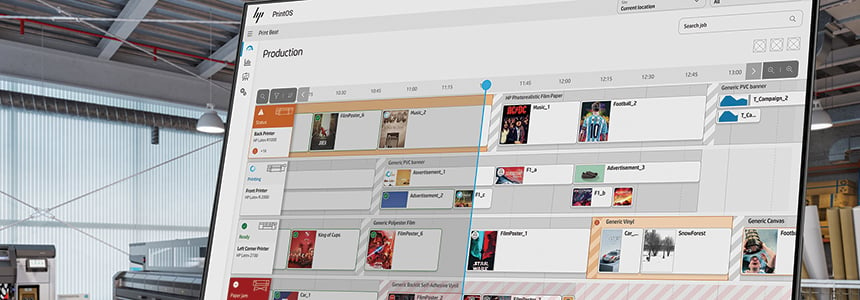
Above: HP PrintOS Production Hub helps streamline many of the preflight tasks that may be manual and traditionally occur between file submission and printing.
The Weakest Link
File preparation is one of the most vulnerable parts in the entire print workflow. “It sits at the intersection of design intent and production reality. Presses have never been faster, but the bottleneck has shifted upstream. Files arrive from a range of creators, applications, and experience levels, and often without consistent standards applied,” shares Heather Long, senior product marketing manager, Fiery, LLC.
It’s no surprise file preparation is where breakdowns occur. David Graves, CEO, Aleyant, says this is due to the disconnect between the digital and printed world.
“When a designer creates a piece on a high-end monitor, they’re working in a perfect, theoretical environment. But print is mechanical and tangible—physical ink, paper movement, and cutting blades. The delay happens because shops are highly automated. When an automated system processes a file that doesn’t match the physical constraints of the press, the machine doesn’t just figure it out; the whole workflow grinds to a halt,” continues Graves.
This is “compounded by the fact that multiple teams interact with a single job from prepress to press operators to finishing. Errors introduced early in the process are not always caught right away and may surface later during printing or finishing,” notes Nick Walters, technical product manager for ink, Durst Image Technology US.
Thomas Giglio, HP Latex Segment Manager, North America, admits that the time spent checking and double checking files is problematic, but “the greatest risk to production efficiency comes when a job must be reprinted due to file errors, creating significant delays, additional labor, wasted materials, and increased operational costs.”
“In most print workflows, the highest cost is not just fixing the file. It is the lost time, interrupted schedule, and delayed press availability,” agrees Mary Gay Marchese, public relations, Markzware, Inc.
What’s surprising, says Lewis Jones III, event specialist, Mimaki USA, Inc., is that PSPs calculate “how long they think a print job should take. Companies build their budgets around these numbers. But all these calculations assume that their files are created correctly. Print workflows are delayed when a company doesn’t factor file preparation into their workflow.”
PSPs are “expected to produce the same design consistently across multiple substrates and printing technologies while maintaining color accuracy, production efficiency, and brand consistency,” points out Ravi Shekhar, senior application specialist, InSoft Automation.
Common Mistakes
Errors in file preparation include design scenarios like missing bleeds, submitting a file as RGB instead of CMYK, low-resolution images, and unembedded fonts.
“The most common issues encountered during file preparation may appear minor during design, but they can significantly impact production efficiency and print quality,” attests Pascal Wybo, product manager PACKZ, Hybrid Software.
Marchese points out that today PSPs receive files from more sources than ever before. “InDesign, IDML, PDF, Canva, and older or orphaned design files. Before a printer can even preflight the job, they often need to identify what is inside the file and whether it can be opened, inspected, or converted.”
Alicia Wallace, customer success specialist, Onyx Graphics, Inc., says “not saving a file with the proper embedded color profiles and rendering intents or not saving the file in the correct format are common. Image resolution is an issue. If images are not set to an appropriate resolution for the expected viewing conditions, print quality can suffer.”
“Designers forget to extend background images past the trim line, or place critical text too close to the edge where it risks getting sliced off. If the printer’s system doesn’t own the exact font the designer used, the text can shift or default to standard Arial. Complex vector effects that look great on screen often flatten unexpectedly on a printing press, creating weird blocks of solid color around images,” explains Graves.
Mark Rugen, managing director of learning and development, SAi, suggests “a major, common pitfall is that each individual element can carry its own independent color settings, which conflicts with the overall RIP color management. For example, a bitmap without an embedded input profile can cause dramatic, unexpected color shifts when the file is processed by the RIP for final printing.”
PDFs are another common problem. “A PDF is not a file format—it’s a container. Inside that container there can be 72 dpi images. Most workflow tools tell you those images are there. They won’t touch them. So the operator is left with a technically flagged file and no automated path forward,” shares Servi Pieters, CEO, Viesus AG.
How to Fix It
File preparation tools help streamline print workflows to hit these pain points.
Organizations must establish a strong process or standard operating procedure for file preparation, which provides the design department with a consistent method for preparing files. “This can be achieved by testing file formats, resolution settings, embedded color profiles, and rendering intents throughout the workflow, from file creation to final print, and evaluating the results in a properly lit environment,” recommends Wallace.
According to Wybo, automation, cloud-based collaboration, and artificial intelligence (AI) are adopted to improve file preparation efficiency and reduce manual touchpoints. “The goal is to process more jobs with greater consistency, shorter turnaround times, and fewer opportunities for error.”
“The most meaningful shift is AI that moves from detection to correction—AI that operates inside of the file formats that print workflows already handle. That’s where file preparation is heading—automated remediation that closes the loop,” says Pieters.
Several of the vendors mentioned in this article offer tools that remove some of the pain from the file preparation process. Visit digitaloutput.net to learn more.
Sep2026, Digital Output