By Cassandra Balentine
Modern print service providers (PSPs) face challenges from labor shortages to increasing job complexity, shorter runs, disconnected systems, and tighter turnaround times.
“Left unchecked, these pressures slow throughput, increase waste, and erode margins,” cautions Bret Farrah, EVP, Xitron LLC.
Impact varies by size and business model, but Chris Odden, director, digital transformation and integrated solutions, software and strategic solutions, Commercial Industrial Printing Group, Ricoh USA, Inc., believes that all organizations struggle with manual handoffs, inconsistent upstream data, increasing personalization, rising costs, and limited visibility into job status and service levels.
Each print business has its own unique mix of problems to solve. Piet De Pauw, head of marketing, Enfocus, an Esko company, points out that wide format businesses often struggle with accurate scaling, cutter alignment, and material nesting, whereas label and packaging printers need MIS-driven automation to maintain efficiency at high volumes. “That’s why flexibility is the most important thing to look for in automation software—you can adapt and evolve alongside the industry.”
The right workflow tools help address many of these issues to improve productivity, reduce waste, and increase the bottom line.
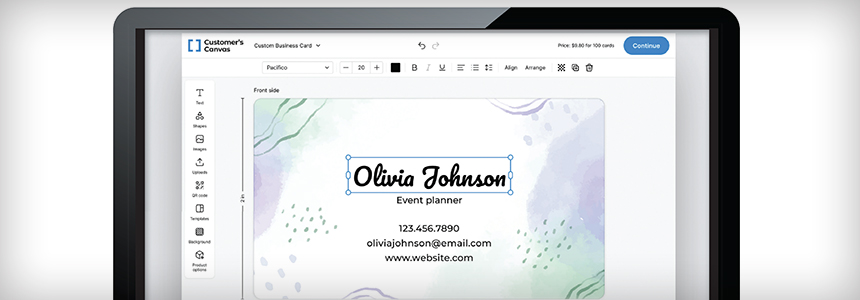
Above: Customer’s Canvas is built to be embedded directly into existing environments. It is designed to serve as the prepress automation engine that bridges the gap between sales channels and backend operations like MIS, ERP, and order management systems.
Integrating, Automating
The biggest challenge is not lack of technology, according to Alex Bowell, managing director, Infigo, but the gap between what systems should be doing and what happens day to day. “As order volumes increase along with turnaround time expectations, many workflows are still held together by manual steps, emails, and last-minute checks that don’t scale. When steps aren’t automated or properly connected, production teams spend more time fixing problems than producing work, and margins suffer as a result.”
Mariusz Sosnowski, CEO, HiFlow Solutions, adds that manual purchase order intake, invoice matching, and receiving validation is a time sink and error magnet. “Over time, these inefficiencies compound, increasing costs, tying up working capital, and preventing production teams from operating at the speed and predictability that modern packaging customers expect.”
As a general rule, Marc Raad, president, Significans Automation, feels that the more printing/finishing devices and disparate software solutions, the greater the need to simplify workflow processes. “Larger, more complex printing environments demand more agile and sophisticated solutions. However, seamless integration of all of a printer’s production-critical processes has always been the primary challenge. This necessary path to integration can be complex, time consuming, and fraught with errors.”
Hans Sep, product line manager, Fiery, LLC, says print providers know they need automation but face a capabilities gap. “The people who understand print production aren’t programmers. The tools that help require technical skills the industry doesn’t have and can’t hire.”
Technology to the Rescue
Workflow tools are beginning to use artificial intelligence (AI) to suggest fixes, classify incoming jobs, and prioritize queues.
Modern automation software attacks workflow challenges through three interconnected approaches—intelligent integration, data-driven decision making, and end-to-end orchestration, suggests Rick Aberle, founder/CEO, Propago LLC.
In any automation solution, Mike Agness, EVP, Americas, Hybrid Software, says integration is key, “You have to be able to get data from a trusted source in order to program around that data—and build the workflows.”
Raad agrees. “Integration is key—and AI is becoming one of the major drivers. AI is already disrupting our industry, revolutionizing traditional practices, and introducing new, more efficient solutions. AI offers huge opportunities to optimize production processes, reduce errors and waste, personalize customer experiences, boost competitiveness, and help employees and management better perform their tasks. AI can read proofs, accept web to print orders, and spot issues with client artwork at the prepress stage.”
AI helps generate data correctly the first time. It also builds the logic behind workflows. “AI can help troubleshoot challenges in the workflow automation solution about required syntax in the coding, but human knowledge is still required to teach any AI engine what needs have to be fulfilled in the workflow,” stresses Agness.
Order Intake Issues
The quality of a file and how it is submitted can start a job off on the wrong foot.
In the growing print on demand industry, Servi Pieters, CEO, Viesus AG, points out that anyone can basically create a print product themselves, among various other reasons why printing companies get sub-optimal files. “However, the uploaded images often lack in quality—in terms of color and resolution. Usually the printing company needs to cancel the order or go back to the customer for a better file. Or they print a low-quality print product, which leads to complaints and non-return customers.”
Dmitry Sevostyanov, CEO, Customer’s Canvas, also sees universal pain points starting at the intake stage. “Inconsistent input data forces operators to waste time manually fixing files. This friction is often compounded by the approval cycle, where simple changes trigger endless email threads between clients and designers, delaying production and frustrating everyone involved.”
David Graves, CEO, Aleyant, adds that depending on how an AI agent is integrated with workflow software, it can provide context and clarity to the results of a preflight report—such as font embedding, resolution, bleed requirements—and change a lot of technical terms to plain language depending on the level of the user.
Modern tools like Caldera’s PrimeCenter prepress automation hub help to optimize, automate, and standardize file preparation before printing and cutting, shares Sebastien Hanssens, VP of marketing, Caldera.
Onyx Graphics, Inc. integrates directly with QuickBooks Online, automating the invoice and payment workflow between order management and accounting software. “We integrate directly with ONYX Thrive, allowing users to submit print-ready files directly from the order to the RIP,” shares Calvin Tuttle, product manager, ONYX Align, Onyx.
Canon’s PRISMA solutions integrate MIS/ERP, data composition, print, and finishing while providing real-time production insights. “Emerging capabilities such as AI-assisted decision making and predictive analytics further reduce operator dependency and improve production consistency,” offers Kevin Roman, director of professional services, Production Print Pro Services, Canon U.S.A., Inc.
Time to Evolve
Within three to five years, Sep predicts workflow automation won’t be a competitive advantage—it will be table stakes. “Print providers without AI-assisted routing, real-time enterprise connectivity, and automated quality control struggle to compete on turnaround, pricing, or reliability. The question isn’t whether to automate. It’s whether to lead the transition or be forced into it by competitive pressure.”
Mar2026, Digital Output