Maintaining the Illusion

By Melissa Donovan

In recent years, media manufacturers have created materials suited for window graphics that give the illusion of not being there at all. The graphics are so good in fact, it may leave the viewer to wonder if they are painted or printed on the window. Decorative by nature, they can also serve functional purpose.

Retail to décor—home and commercial—are ideal environments for window graphics. Offices in particular benefit from the opportunity. Despite the growing trend of open concept, work environments do still call for some enclosed spaces. Glass walls are an option, and leveraging aptly applied window graphics provides just the right balance between privacy and spaciousness.

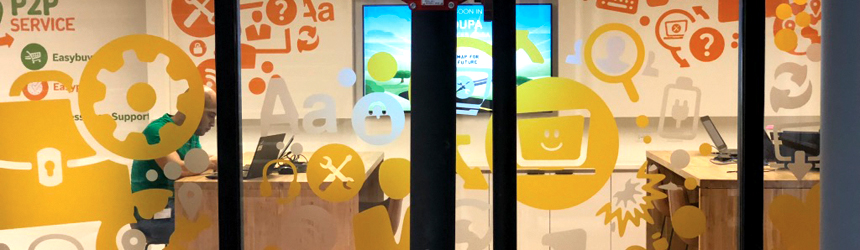
Above: Source One Digital of Norton Shores, MI created window graphics–in addition to other applications–for Unilever’s corporate campus. A majority of the window film used was Lintec’s E-2200ZC, an optically clear PET film.

Bringing It All In
Based in Norton Shores, MI, Source One Digital is part of RC Productions. RC Productions began as an advertising agency in 1981. Increased demand for large format signage arose overtime. Outsourcing was the initial option, but finding a printer to meet its high-quality standards was difficult. In 1996, RC Productions acquired Signs by Jim, and that is how Source One Digital became the company it is today.

The print service provider (PSP) operates out of a 25,000 square foot facility, which is complemented by a 10,000 square foot warehouse, production, and fulfillment base located nearby. Serving customers throughout North America, Source One Digital offers extensive grand format digital printing and finishing capabilities. It is G7 certified, with an intense focus on hitting clients’ brand colors 100 percent of the time.

“The hallmark of Source One Digital is an unwavering dedication to deliver the highest quality product. Our staff is an experienced team of digital printing specialists and preflight engineers. We utilize the latest printing technology and achieve brilliant, consistent color across all projects,” shares George Atkinson, VP of marketing and sales, Source One Digital.

Clients include retailers, design firms, and sports and event organizations. Applications range from in-store signage, floor graphics, and vehicle graphics to awards and promotional products.

Optical Clarity
Ten percent of Source One Digital’s business involves window films. Increasingly used in commercial office spaces, medical facilities, and retail, according to Atkinson, custom window films allow for a range of both decorative and privacy effects. “Custom window films offer the ability to incorporate branding into the design and provide stunning results at a fraction of the cost of custom glass, adding interest and color to glass surfaces,” he continues.

The PSP regularly works with optically clear film from Lintec of America, Inc. It is preferred for its scratch resistance, high-quality print, and true optical clarity. The scratch resistance in particular allows the product to remain in good shape during installation, use, and removal.

To print on window films, Atkinson admits achieving the painted-on look requires just the right equipment. The company spent over a year traveling and meeting with manufacturers, and testing printers until it found the correct combination to produce a high-quality, custom window graphic. It is currently using a UV roll-to-roll printer configured specifically to its custom specifications.

Atkinson agrees that open office environments are trending, meaning more glass windows and walls are incorporated into office designs. “With more glass comes the need to reduce the fishbowl effect and create distraction and privacy effects to create a more enjoyable work environment,” he explains.

With this trend, the use of optically clear polyester films is increasing. Invisible where there is no color or graphic, these films still beautifully show color and fine detail, says Atkinson. He also believes they are much easier to install than intricate cut and weeded patterns.

Corporate Campus Windows
The PSP was recently part of the printing process for all of the window and wall décor found in Unilver’s new corporate campus located in NJ. Source One Digital was chosen for the job through its client, InnerWorkings, which was the on-site partner project manager.

Custom printed window films in all shapes and sizes were created for four different office buildings. Designs included distraction bands, full privacy effects, unique etched effects, and graphics that matched interior wallcoverings. The variety was one of the most exciting parts of the entire project, according to Atkinson.

“Window films are used more as a décor item similar to custom wallpaper. Designers look for more color, transparent, translucent, and custom privacy effects. Window and glass surfaces are becoming a focal point of interior décor in many ways and are decorated just like walls with custom printed graphics,” he shares.

The majority of the window film used on this project was Lintec’s E-2200ZC. A scratch resistant, optically clear PET film, it features a UV permanent adhesive with a 2-mil thickness. It is available in 61-inch by 150-foot rolls.

In addition to the window graphics, Source One Digital also produced custom printed wallpaper, magnetic material, and standard cut vinyl.

“Source One Digital was a great partner to work with on this project, as it understands the latest techniques in window films,” says Penny Simon, production manager, InnerWorkings. Install was completed by the InnerWorkings team, which commented on the dynamic colors, high print quality, and easily installable materials.

Committing to New Trends
Source One Digital is committed to the growing window media trend. With job after job under its belt, its expertise in window films is unmatched thanks to a combination of quality media and specially configured printing devices.

May2018, Digital Output

Color Considerations

By Cassandra Balentine

Color is an important element of printing that must be managed throughout the entire production process, starting with design. A variety of standards help ensure accurate and consistent color, which is achieved with the help of sophisticated tools and skilled operators.

One step towards color management is the ICC profile. Developed by the International Color Consortium (ICC), ICC profiles help characterize color in a standardized manner. In addition to preset profiles for specified combinations of printer, ink, and media, custom profiles are built using color management tools.

Color accuracy and consistency is further managed with the help of digital front ends (DFEs), workflow software, color measurement sensors, and proofing and verification tools.

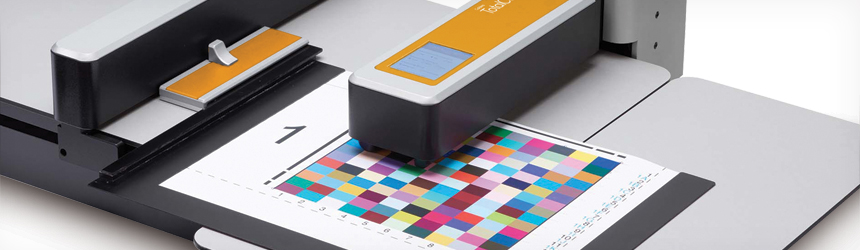
Above: Caldera TotalColor is a complete solution for color management and profiling.

Customer Expectations
Print buyers demand accurate and consistent color. Expectations are increasingly sophisticated. “There is no room for error or faulty colors. All colors—especially brand colors—must look consistent and great, regardless of the printer or substrate used,” shares Bart Fret, director of large format sales, GMG Americas.

Bryan Manwaring, director of product marketing, Onyx Graphics, Inc., agrees, adding that customers need to know their print service provider (PSP) offers accurate, consistent color that conforms to standards.

Print buyers want more consistent color and are more likely to switch PSPs to get it, suggests Dean Derhak, product director, SA International (SAi). “This gives a competitive advantage to PSPs that demonstrate proficiency in color consistency.”

“The ability of a print provider to match image color and quality across multiple devices or substrates, and to hit brand identity colors consistently will help them gain and retain the most profitable business,” says Mark Gallucci, manager, technology marketing, commercial software, Agfa Graphics.

Print buyers know what colors they expect to see in their products, so communicating color and making expectations clear up front is critical. “Not only do PSPs need to match colors in production, they also need to communicate intelligently about color at the beginning of the buying process,” explains Derhak.

According to Kerry Moloney, product marketing manager, Fiery wide format products, EFI, customers expect their logo and brand colors to be printed with the closest possible match, no matter what the substrate. “We see many colors requiring prints that conform to one of the print industry standards, independent of substrate limitations.”

Peter Pretzer, ColorPath solutions development manager, Fujifilm North America Corporation, Graphic Systems Division, says educating customers on what is possible and setting appropriate expectations is a challenge. “If they are touting accuracy, predictability, and repeatability, they should know what it takes to achieve those ends and remain profitable.”

“If customers can specify achievable designs from the get-go, the entire process is smoother,” admits Ray Cheydleur, print, packaging, and imaging product portfolio manager, X-Rite, Incorporated.

Expectations differ greatly from customer to customer. Darrian Young, VP of workflow automation, Aleyant, points out that some customers are satisfied with pleasing color while others demand exact reproduction of brand and corporate colors.

“It has become possible for anyone to have anything printed on a product,” says Robert Nute, president, ErgoSoft Americas. “But those PSPs who focus on and understand color management will ultimately win the consumer by delivering a higher quality product at a competitive price.”

Color Challenge
Color management is complex and intimidating. PSPs may struggle with color management across devices, ink, and media as well as over time due to maintenance cycles. “It is important that PSPs have a malleable solution that provides the same output across device, ink, and media,” recommends Manwaring.

“It is at the same time a science and a religion in the printing industry. PSPs need to understand that the most critical component of a color management system is to have a system,” offers Nute.

Without training or formal color management processes, print providers often struggle with color consistency. “Color process controls like G7 calibration and profile simulation become important for more complicated jobs,” says Derhak. It is difficult for PSPs to get accurate or consistent color when they don’t use ICC profiles in their RIP software that match the media loaded in their printers.

There is often a lack of standardization and this is aggravated by the lack of standardization of printing materials available to the PSP. “There is often also a reliance on the pre-bundled RIP that drives each separate wide format inkjet digital printer to provide accurate color between every printer. This is an impossible task, as it cannot be done without centralized color management,” cautions Fret.

Gallucci adds that lower quality inks or substrates often introduce instability from batch to batch.

Media’s Role
The increasingly varied range of media available is a challenge that affects color quality and consistency.

All substrates and ink combinations behave differently. “Even changing resolution or screening settings produces a color shift,” shares Moloney. Color management compensates for any differences these variables bring in. This is why it not only needs to be comprehensive in terms of the tools provided with a solution, but also easy to use.”

Manwaring adds that different substrates require different color managed profiles to ensure superior color output that is accurate, consistent over time, as well as conforming to color standards. “PSPs absolutely need the right tools at their disposal to achieve output that meets their customer needs,” he says.

Every piece of media absorbs—or doesn’t absorb—ink differently, which affects the final result, points out Fret.

“The basics of the color management are the same, regardless of the media. However, matching colors across media and ink types is very difficult without color management across the production workflow,” says Derhak.

It is important to remember that one profile does not fit all. “Variables such as number of passes, resolution, gloss, ink density, and substrate brightness can and will change print conditions visually. How painful is it for incorrect color to leave the shop? Today’s tools can help minimize the chance of that happening and the ability to profile for an individual medium is faster than ever,” shares Pretzer.

Color Management Tools
Color output standards are consistently updated and improved. Today’s color management tools are faster and profiles are easier to create. Calibration steps are more intuitive. Measurement devices adopt new modes that allow for second surface readings. In addition to software, spot color measuring devices, spectrophotometers, and spectrodensitometer tools are often utilized within a wide format print environment.

Here, we highlight several color management tools and discuss their role within a wide format workflow.

Agfa’s Asanti production workflow includes a fully integrated suite of calibration, profiling, and color management tools. It features integrated preflight, layout automation, color management, and rendering using Adobe’s PDF Print Engine. The program provides a wizard-driven process that enables operators to calibrate, set ink limits, and profile new media. Advanced tools facilitate G7 calibration and spot color tuning for accurate brand color matching across print modes, substrates, and devices. Asanti is ICC based and imports from or exports to any other ICC tool.

PressTune, part of Agfa’s ECO3 solutions, provides advanced calibration, management, and tracking tools. It offers validation, trend analysis, and integrated recalibration for multiple machines and print sites. PressTune is G7 certified and works with a variety of printing systems, including inkjet, toner, or offset.

Aleyant offers TFlow, device link, and spot color management. Files are color converted and tagged according to the standard as well as user-defined color spaces. Spot colors are checked and normalized, and can be renamed, converted, or color values replaced. Transparencies and overprints are also managed with optional flattening with additional treatment of rich blacks and white.

Aleyant QualityControl converts the X-Rite i1 Pro family or X-Rite eXact into a high-end spectrodensitometer by providing colorimetric and densitometric functionality. QualityControl also works with other color libraries for spot color quality control.

Caldera software includes a color management solution based on ICC technology. The EasyMedia module is in all of its RIP packages. This wizard-based tool allows users to calibrate and characterize printers, resulting in profiles that correspond to print configurations—including media, ink, resolution, qualities, and various mechanical and color parameters. “It is simple and powerful. Everything is preconfigured to capture the best printer gamut,” says Arnaud Fabre, product manager, Caldera. Fine tuning options are available for those with more advanced color management skills or those that want to learn by trial and error.

EFI offers a variety of color management tools. For example, Fiery proServer and Fiery XF are hardware and software, respectively. Fiery DFEs for wide to superwide inkjet print production come with proof-grade tools and options for managing color. “Customers can choose per job how tight color needs to be and treat jobs accordingly. Built-in spot color libraries also mean extremely good out-of-the-box results for brand colors. There are also many features for fine tuning, plus creating custom colors,” explains Moloney.

Fiery products are based on ICC technology. “They also benefit from sophisticated interactive routines for honing color quickly and easily for an even better simulation, whether process or spot color matching is required,” continues Moloney.

ErgoSoft offers a suite of color management tools consisting of integrated products to define printing system settings, create linearization, and generate a multicolor profile.

ErgoSoft RIP solutions feature three core systems that together provide a multicolor color management solution. From within the print environment, the user has control over the baseline settings for the printer, resolution, speed, and device options. The advanced dither settings enable a higher level of control over how drops of ink respond to media in variable drop size printing platforms.

Once the baseline settings are established, the next step is to create the linearization. ErgoSoft RIP solutions feature an integrated proprietary linearization application that is easy to determine the density end points of primary ink channels based on the spectral data gathered by a spectrophotometer.

Nute says the software supports all color systems. “It is possible to achieve G7 certification using ErgoSoft’s linearization tools and ColorGPS. It is easy to import Pantone color books to facilitate spot color replacement.”

Fujifilm produces and uses ColorPath SYNC DLP and ColorPath SYNC Brand Color Optimizer for wide format digital printing color management.

ColorPath SYNC DLP is a cloud-based solution that creates optimized device link profiles with integrated validation and reporting. It allows for fast, easy-to-use color alignment of multiple output devices to a common color target or industry specifications. ColorPath SYNC DLP works with any DFE that accepts device link profiles and uses X-Rite’s current USB-based spectrophotometers for data acquisition.

Because it’s cloud-based, any web-connected computer quickly becomes a ColorPath portal for measuring, creation, optimization, and reporting. There are no software or server platforms to maintain so the latest tools are always available and data is always secure, says Pretzer. “A simple interface means excellent results can be achieved quickly and accurately without having to be a color expert,” he adds.

ColorPath SYNC Brand Color Optimizer predicts, creates, and optimizes accurate brand color libraries for digital devices. With Brand Color Optimizer, the accuracy of a brand color library is predicted based on the previously described process. The library is then optimized by printing and measuring a chart containing every patch in the library. ColorPath SYNC Brand Color Optimizer works with Fujifilm XMF and other Fujifilm-supported DFEs. It uses X-Rite’s i1 Pro 2 family or i1iO Automated Scanning Table for data acquisition.

GMG offers two systems that provide centralized color management—GMG ColorServer and PrintFactory powered by GMG.

Fret says many companies have issues matching colors with different RIPs driving different printers on the same print floor—each often with their own color management. “This results in a total loss of color consistency between printers, but also between prints on the same device using different media or the same media produced at different times.”

The solution is standardized printing that reduces color deviations and variations produced by different printers. GMG ColorServer—and the GMG engine with PrintFactory—is a centralized system providing reproducible, high-end results through device link profiles.

With GMG ColorServer’s device link profiles, Fret believes RGB-to-CMYK conversion achieves smoother separations than an ICC workflow could do. Also, spot colors can be converted to the printer’s process colors using the maximum available gamut.

The optional, fully integrated GMG SmartProfiler is a software wizard allowing any user to calibrate, recalibrate, and profile digital printing systems easily and without advanced color management knowledge.

While PrintFactory powered by GMG is its own separate workflow, GMG ColorServer can be easily integrated into any popular workflow. GMG also ensures that artwork printed on different materials match each other and that the print result is consistent week to week, month to month, and year to year.

Onyx is a RIP and print workflow solution provider. “One of our key differentiators is our bespoke color engine built specifically for wide and grand format print. ONYX Color includes built-in G7 verification and ink savings with GCR Plus without compromising on color output. Users build ICC profiles that maximize color gamut to match their customers’ brand color needs by following a simple print, read, next walkthrough, resulting in superior color output,” says Manwaring.

A supporting color management tool within ONYX software is Swatch Books, which helps find the best possible match to any given color when media and ink combinations fall short of achieving brand colors. “Printing with Swatch Books takes the guesswork out of color matching and provides a means for PSPs to set expectations with their customers regarding final output,” shares Manwaring.

SAi’s Flexi wide format RIP software includes a full media profiling wizard, which guides PSPs through the media color profiling process. SAi Flexi also provides tools for automated Pantone and manual spot color matching of custom spot colors.

SAi differentiates itself by making color management easier for people without a color management background, says Derhak. “Flexi is a complete wide format color profiling RIP solution available by subscription. For as little as $50 a month, PSPs can have a full-featured RIP with color media profiling capabilities.”

SAi Flexi color management software works with ICC compliant media profiles. It also integrates with the printer manufacturer’s online media color profile libraries. “This means that PSPs only need to load the media in the printer and Flexi automatically loads the correct media profile from the printer manufacturer’s library,” explains Derhak.

X-Rite offers a number of color management tools suited for wide format digital printing. X-Rite, together with its subsidiary, Pantone LLC, provides a true end-to-end color management solution.

Starting in the design process, cloud-based tools like PantoneLIVE Design provide designers and prepress teams access to Pantone digital color libraries as well as private brand color libraries and for use during the inspiration, creation, and prepress phases.

In prepress and production, wide format operations take advantage of X-Rite’s spectrophotometer offerings including the i1 Pro 2 family or its next-generation eXact handheld solution. These tools check output quality against a physical or digital sample. Each also offers automation options.

X-Rite also provides a range of tools for profiling and calibrating everything from cameras and monitors to printers and scanners.

Consistent and Controlled
Color is critical and complex. It is maintained and measured throughout the production workflow. PSPs look to a range of color management tools, from handheld color sensors to ICC profiles and sophisticated, end-to-end software. To succeed, PSPs must set customer expectations up front and meet color demands.

May2018, Digital Output

Multiple Solutions

By Olivia Cahoon

Wide format flatbed printers print to a variety of substrates beyond traditional materials including ceramics, tile, and glass. Industries using decorative ceramic pieces, like home and commercial décor, are excited about the possibilities of digital printing technology. It offers low runs produced cost effectively with print quality that meets the standards of traditional methods.

Dedicated digital ceramic printers are also available for ceramic printing but target industrial applications for manufacturing. For print service providers (PSPs), wide format flatbed printers are available as an alternative printing method for ceramics.

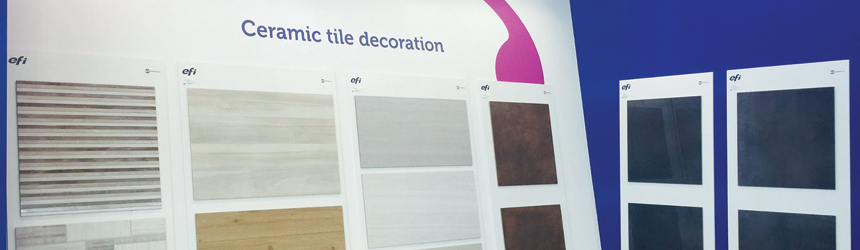
Above: Examples of ceramic tile decoration from EFI.

Digital Productivity
Decorated tiles are printed with traditional or digital methods. Traditional ceramic printing methods are intended for high-volume runs with little customization. For example, rotogravure analog presses can only change the design by stopping the machine, exchanging the cylinders, and adding additional touchpoints, says Raimar Kuhnen-Burger, regional marketing manager, EFI Industrial Printing.

Digital printing offers a non-contact solution for decorating ceramics including tile and glass. It provides high-quality output, control, reduced tile breakage, and minimization of repeat patterns. “A digital machine can change the design on the fly and produce in a cost-effective manner even at low volumes,” explains Kuhnen-Burger. Industrial-level, single-pass inkjet printing almost reaches the volume of rotogravure—pushing digital productivity to new heights.

Ceramic printing requests stem from industries that require customization. In today’s industrial sectors, designs change quickly, and manufacturers need to meet this demand. By implementing digital technologies, Kuhnen-Burger says manufacturers cost-effectively produce even lower volumes while reducing turnaround time and stock. “We also see a clear movement in the printing industry towards individualization. This can only be achieved with digital printing.”

Industries seeking customized ceramics include artists, home and commercial décor, and wall and floor manufacturers. Jay Roberts, product manager, UV printers, Roland DGA Corporation, says many print providers use digital devices to add CMYK graphics and simulated embossing and textural effects, which provide value and appeal to a range of custom and boutique products. “This typically involves small runs or one-offs to create truly unique one-of-a-kind offerings,” he adds.

With the ability to print directly onto tile and glass, PSPs offer unique products with greater profitability. Jim Peterson, COO/founding partner, Vanguard Digital Printing Systems, offers, “PSPs are finding more creative ways to meet demands. Moreover, end users are finding more creative ways to market their brands and rely on flatbed printers to accomplish this.”

Wide Format Flatbed Devices
Flatbed printers output on a variety of materials like acrylic, ceramic, leather, plastic, and wood. A full-size flatbed UV printer between 4×8 and 5×10 feet allows for a variety of work on an abundance of media in addition to tile and glass—diversifying overall product offerings to clients, suggests Peterson.

Working with a smaller flatbed UV printer can limit the PSP’s work and compatible media sizes. “In addition to other media, for high-volume tile and glass jobs a larger table allows clients to image multiple pieces rather than one at a time,” adds Peterson.

Vanguard offers the VK300D UV digital printer with a 5×10-foot print width. It handles a variety of materials including acrylic, brick, glass, porcelain, and stone. With eight printheads, it prints up to 40 boards per hour with a four-inch thick print capability.

According to Roberts, some flatbed UV printers use fixtures, which lock the product into a specific spot for printing. This enables the user to control how and where the graphics are produced in addition to keeping ceramics in place.

The Roland VersaUV LEJ-640FT features a 64×98-inch print bed capable of printing to glass and tile. It runs heavy, rigid materials up to six inches thick and weighing up to 220 pounds. The printer utilizes CMYK, white, and clear coat ink to offer special effects including textures and simulated embossing.

Flatbed printers also allow PSPs to produce several tiles at one time, says Javier Mahmoud, VP of sales and marketing, CET Color. He believes adhesion and curing is the first consideration to implementing a wide format flatbed device for ceramic printing. “If these two things cannot be done then price point, material versatility, efficiency, or speed does not matter.”

CET Color’s K2-1000 UV flatbed printer uses UV LED curing lamps to instantly cure UV ink on both the left and right pass. Its combination of Kyocera printheads, inks, and UV LED curing technology outputs up to 31 boards per hour with two printhead rows.

Today’s digital technology allows several flatbed UV printers to print much more than just ceramics. Rather than selecting a dedicated ceramic printer, Peterson believes a PSP should implement a wide format flatbed suitable for ceramic printing when a client wants to expand their product offering and increase profitability. “With this in mind, our clients find the need for a dedicated ceramic UV printer is greatly minimized if not eliminated.”

Peterson encourages clients to consider their overall product mix along with products and markets they would someday like to attain. “Flatbed UV printers are extremely diverse and unless high volumes and contractual commitments are in place, we caution clients on purchasing a dedicated machine for any particular type of work.”

Dedicated Ceramic Printers
Successful digital adoption in the ceramic market creates opportunity for manufacturing companies and industrial ceramic applications. For high-quality manufacturing, businesses opt for a dedicated ceramic printer. They allow versatility and produce batches with individual unique tile pieces.

“While a flatbed device might be a good match for lower volume prints, industrial applications need higher volume and tight integration into the production process,” says Kuhnen-Burger. He believes this is only possible by using single-pass technology, which produces quicker results compared to multi-pass printing.

EFI’s Cretaprint industrial single-pass ceramic printers print up to 70 linear meters and up to 1.8 meters wide. According to Kuhnen-Burger, this gives real industrial throughput for tile manufacturing plants. The EFI Cretaprint D4 features 12 printing bars for ceramic printing and special finishes like white, reactive, luster, matte, and glossy. It prints up to 60 meters per minute (m/min) and a Double Tile Printing feature allows simultaneous printing of two tiles of different formats and with varying designs.

Several dedicated ceramic printers offer special effects for ceramic decoration. For example, Durst Group’s Gamma XD Series offers special effects including luster, glossy, matte, white, metallic, and glue. The eight-color inkjet ceramic printer offers a maximum printing width of 1,404 millimeters (mm) and speeds up to 76 m/min. It uses Digital Material printhead technology and jets large amounts of digital ceramic material and glue inks.

Dip-Tech, a Ferro Company manufactures the Nera D series of printers specifically designed for printing onto glass. A versatile printing carriage allows for printing different applications without changing ink tanks or making other setup changes. Up to 12 ink channels offer production flexibility, with high-resolution printing up to 1,410 dpi.

Dedicated ceramic presses also create a variety of tile designs with unlimited glazes, colors, and dry powders. The KERAjet S7 prints with ceramic pigments, soluble salts, solid applications, glazes, and UVI inks. It features an 1,800 mm print width and handles tiles up to 46 mm thick. It prints up to 90 m/min with a resolution of up to 1,200 dpi.

Both dedicated ceramic printers and wide format flatbed devices offer the print width capability for ceramics. As a dedicated solution, ceramic printers are an investment for print providers that intend to offer ceramic-only applications. Wide format flatbed devices are more suitable for PSPs looking to add ceramic decoration to existing offerings.

UV Printing
Most wide format flatbed devices for ceramic printing use UV or UV LED ink for its ability to bond to a variety of surfaces. UV methods include organic ink that is fixed and dried to the glass by UV lamps.

According to Roberts, UV is the best method available for printing to ceramics. “Customers appreciate the durability and longevity of graphics, as well as gloss, white, and primer capabilities.”

UV printers offer the ability to print CMYK and white—if needed—saving in extra steps and possible human error, says Mahmoud. “We see requests for ceramics for drink coaster products and school logos,” he adds. UV methods are efficient for small runs and customized orders.

Some UV ink sets may not provide the necessary level of adhesion and require adhesion promoters. Adhesion promoters enhance ink and coatings on difficult substrates like ceramics and are applied by hand or with an automated system. The use of adhesion promoters enhances ink and coating adhesion and ensures ink remains on the substrate.

Because there are multiple types of ceramic tiles and finishes, Roberts believes that adhesion promoters are crucial. “While pre-manufactured tiles may not require an adhesion promoter, we have found that on fired or glazed tiles, the use of an adhesion promoter is often necessary to ensure durability that’s acceptable to the end user. The end user always dictates the acceptable level of durability and the PSP must be able to meet the user’s expectations and requirements.”

Mahmoud believes adhesion promoters are not always necessary but depend on the project and ceramic type. “There are too many variables and tile types to know if a promoter is needed. So far, the tiles we have done have not required any promoter.”

Alternative Methods
Aside from UV printing, other ceramic printing methods are available with the use of special ceramic inks. Kuhnen-Burger says EFI’s Cretaprint ceramic printers don’t use UV inks but instead print with special ceramic inks on the raw tile as part of the tile production process. “Ceramic print does not necessarily make use of the CMYK color scheme, instead EFI provides an ink ecosystem that includes dedicated ceramic inks and special effects,” he offers. With EFI’s ceramic printing method, adhesion promoters are not required.

Dip-Tech also sells an alternative printing method for ceramics. Dip-Tech Digital Ceramic inks are fused into the glass during the tempering or annealing process for unlimited colors and designs. The formula results in glass that can be laminated, bent, or double glazed. Dip-Tech ceramic inks are fully recyclable and resistant to scratching, UV light, and weather for outdoor use.

Decorated Ceramics
Digital ceramic printing offers high-quality output and a non-contact solution for decorating ceramics like tile and glass. “Advancements in image quality transform the flatbed UV marketplace, providing the opportunity to produce a high-quality print to tile and glass,” shares Peterson.

Several options are available for ceramic manufacturers and PSPs when it comes to selecting a digital ceramic printer. Dedicated digital ceramic printers offer printed ceramics with long-term use and high-quality manufacturing while wide format flatbed printers are more suitable for PSPs seeking new markets. Regardless of the method selected, digital printers offer high-quality output and customization for decorated ceramic pieces.

May2018, Digital Output

Relationships of Respect

By Melinda Tetreault

While buying direct from manufacturers certainly has its perks, distributors are a great resource. They act as a print service provider’s (PSP’s) partner, with the knowledge to direct them towards the best material, printer, or software possible without having brand bias. With this type of relationship, customers and vendors mutually benefit in ways that grow their respective companies and open additional avenues in technological support, monetary growth, and integration of knowledge.

Above: Unique to Global Imaging is its Workflow Studio, which PSPs can visit for hands-on demonstrations.

The Benefits
Overall, distributors are a part of a potentially successful business model. Based on experience, many share the imparting wisdom—shop around.

“If you find the right distributor it can mean the world for you. However, not all distributors are the same. We have a saying in our office—we want to earn your business,” admits Terry Boylan, president, Coast to Coast Printing Supplies LLC.

“A great distributor grows with you, learns what you need, adjusts as they go, and is available to help you through production and service needs as they grow. Working with a great distributor means partnering with someone interested in your company’s success and works with you to achieve more,” adheres Tracey Schaub, sales manager, TyrrellTech, Inc.

David Fisher, CEO, Regional Supply, agrees. “A true distributor employs a knowledgeable sales staff; they personally know you and your business; they offer consultation on products and uses, troubleshooting, technical support, and training; they offer prompt delivery; and have a large inventory and fair prices. If you find a distributor who fits that description, they should be your first choice.”

According to Jason Bartusick, president, Media One USA, the monetary benefits of pairing up with a distributor include not having to manage claims to get credit, faster lead times, and improved cash flow.

“The hidden savings is the time the customer saves not having to talk with several manufacturers and distributors to identify the right equipment, sell their own current equipment, solve technical issues, work with their bank or an outside finance company for funding, and collaborate with yet another company for their ink and media needs,” shares Tara Lamb, president, Global Imaging.

Convenience is also a deciding factor. “Having a local resource for advice and speedy product delivery are two key advantages,” says Pete Ordway, president, Ordway Sign Supply, Inc.

Jim Redmer, director of marketing, Wensco Sign Supply, explains that distributors are often a local resource with personnel that the customer gets to know and can rely on for help with projects. Being local, many distributors offer pickup nearby when a product is needed quickly.

“Partnering with a supplier has many benefits. Sales and technical team members offer an unbiased, honest comparison of equipment and consumables. Our team researches industry trends and stays current in technological advancements to help clients enhance their capabilities when the time is right,” adds Kathy Murtell, marketing manager, The Mosaica Group.

Rick Burdick, VP, corporate sales – print solutions, Veritiv Corporation, also believes distributors provide scale and expertise to PSPs.

“Distributors are set up to handle the true sale, support, service, and day-to-day follow up on the equipment and products of today’s demands,” advises Matt Gusse, VP sales and marketing, Advanced Color Solutions, Inc. (ACS).

They also are in touch with the latest trends. Juan Pablo Sosa, sales director, Cigraph USA Corporation, shares that his company keeps all specialty supplies in stock and is always updated in regards to the newest products and equipment technology.

In it for the Long Run
Distributors have a range of collective experience. Some companies became established as recently as the 2000’s and others celebrate over 80 years in business. It is clear that those invested in distributing products to PSPs are in for the long run. Here we provide information on distributors serving the wide format graphic arts.

ACS was established in 2001. With business reaching the North Americas and some of Central and South America the company is based out of Corona, CA. From its CA location it offers its customers next/same day shipping. With an executive staff holding over 20 years each of experience, it is an excellent resource for dye-sublimation (dye-sub), eco-solvent, and heat transfer embellishment services.

With a start in 2012, Brand Management Group (BMG) is a subsidiary of S-One Holdings Corporation. Its global outreach includes five U.S.-based warehouses and 14 warehouses globally, with main headquarters in Sarasota, FL. The company is the licensee for HP Large-Format Printing Materials and Kodak wide format inkjet media. According to Jeff Leto, leadership, BMG, the company is more than a distributor. “We not only bring products to market, but we work with brands to plan their go-to-market strategy and execution.”

Cigraph USA began in 2000. Today it is a regional wholesaler specializing in large format digital equipment and supplies. It began in Venezuela selling cutting adhesive vinyl but grew by adding leading brands to its portfolio of products ranging from printers, cutters, and trimmers to flexible and rigid materials and ink. The U.S. headquarters is based in Hialeah, FL and focuses mainly on the FL market, offering same-day shipping to its customers.

Conroe, TX-based Coast to Coast currently services all 50 states, with a vision to serve customers worldwide. Within the next six months it plans on opening a second warehouse in CA, and a year after that hopes to open two additional warehouses strategically located across the U.S. to accommodate less than two day shipping requests. The distributor is built to offer more than just a product. “What makes use different is the fact we want to partner with our customers. Your problems are our problems,” shares Boylan.

FELLERS boasts over 70 locations in the U.S., which allows it to send product to most wrap shops in one to two days with standard UPS ground shipping. With its main headquarters in Tulsa, OK, the company’s over 45 service representatives are available 7:00 a.m. to 7:00 p.m. CST to answer questions. FELLERS offers a selection of wrap products with multiple brands in most product categories. According to Stacy Clausen, VP of marketing, FELLERS, this allows customers to choose the product that best fits their needs based on performance and price.

Global Imaging was established in 1995. Based out of Louisville, CO it ships from around 50 warehouses worldwide. Out of these, Global Imaging only operates two of its own warehouses. Master distributors in sites throughout the U.S. run the other locations, which allows the company to offer one day ground shipping to 90 percent of the U.S. Unique to the company is its Workflow Studio, which PSPs can visit for hands-on demonstrations of an end-to-end workflow including RIP software, color management, grand format printers, digital flatbed cutters, heat presses, sewing equipment, silicone edge graphic framing systems, and 3D printing.

Grimco, Inc. has over 50 locations throughout Canada and the U.S. In business for over 140 years, the national wholesale sign supply manufacturer and distributor provides traffic signs, blanks, substrates, boards, digital print media, wrap films, sign vinyl, application tape, banner material and supplies, sign frames, banner stands, LEDs and electrical accessories, grand format solvent/UV/latex printers, inks, and software.

LexJet, also a subsidiary of S-One, manages five warehouses across the U.S., with business dealings also in Australia and Canada. In business since 1994, the company offers next/same day shipping of wide format solutions for aqueous, latex, solvent, and dye-sub printing. LexJet-branded products, an OEM portfolio, unlimited technical support, and extensive online educational resources round out its portfolio. “When end users work with LexJet, they not only get the right products for the right jobs, but, because we focus on customer intimacy, they also get a knowledgeable business partner to help them grow their business,” shares Dean Lambert, VP, LexJet.

Media One is based in CA with three total locations servicing clients throughout North America. In business since 2001, it offers next/same day shipping on most orders. Special services or products that help the company standout from the competition include its color profiling techniques and textile finishing products.

Founded in 1974 as La Crosse Litho Supply, Inc., the Mosaica Group became the company it is known as today in 2012. Based out of Sussex, WI, it has an additional warehouse location in Brooklyn Park, MN. Supporting wide format printing as well as other print processes with equipment, consumables, and services like consulting and color management, the company is positioned to address clients’ current and evolving challenges.

National / AZON reaches PSPs in Canadian and U.S. markets. Established in 1985, the company’s main headquarters is based in Troy, MI. It operates five warehouses throughout the U.S. allowing it to offer customers same/next day shipping. To differentiate itself from the competition, the company provides integration services, leasing, creative reseller inventory programs, color department support, front line product support, hardware setup support, and installation reference.

Ordway Sign Supply provides distributing services to the U.S. with a concentration on Southern CA. In business since 1983, the company’s specialty is large format, print and cut, and related supplies. Out of its one location in Van Nuys, CA it offers expert maintenance and repair services and wholesale printing services to the trade.

Paradigm Imaging Group, Inc. celebrates being in business since 1989. Servicing customers in North America, the company’s main headquarters and warehouse is located in Costa Mesa, CA. It is the sole distributor for Colortrac, Graphtec, Kurabo, and Rowe scanners for North America in addition to PIXis eco-solvent and UV printers. Being a distributor allows the company to work more closely with its reseller channel and gain insight into industry equipment and service needs.

Regional Supply is well known for its education and training, as well as its in-house technical support, in-house fabrication, and diverse employee base. Started in 1946, the Salt Lake City, UT-based company has three warehouses located in the U.S.

Richards Distributing Inc., established in 1987, ships to all 50 states via UPS. Its one warehouse location is in St. Joseph, MO. It honors same day shipping if the order is placed before 2:00 p.m. CST. Order quantities are not a concern according to the company, no order is too small.

TyrrellTech is based in Laurel, MD and focuses on much of the eastern coast of the U.S. with additional offices in Orlando and Pompano Beach, FL and Flemington, NJ. It began in 1997 and continues to achieve what Schaub refers to as being “the real deal when it comes to value-added resellers.” The company has four demonstration rooms full of machines to keep current on the latest product introductions and staff well trained. “We believe that the machine sale is the beginning of a long-term relationship in which we work with the customer to teach and train them and to grow their business,” continues Schaub.

Veritiv was formed into the entity it is known as today in 2014 after a merger between Unisource and xpedx. It distributes wide format products throughout Canada and the U.S. with main headquarters located in Sandy Springs, GA. The company has 170 distribution centers across North America. With a longstanding commitment to wide format business needs, according to Burdick, Veritiv provides a variety of flexible and rigid products for wide format PSPs.

Wensco’s main headquarters is located in Grand Rapids, MI. Besides this location, it also has three warehouses in Davenport, IA; Chicago, IL; and Farmington Hills, MI, which allows for shipping to all 50 states via UPS. In business since 1937, Redmer lists some of the services that make it stand out from the competition including substrate cutting, an innovative website, and fully stocked warehouses.

Value-Added Resellers
Overall, partnering with a distributor can provide increased monetary influx, local products with fast delivery, and troubleshooting and technology support.

May2018, Digital Output

Profitable Partnerships

By Digital Output Staff

The International Sign Association (ISA) did it again, achieving record attendance for its ISA Sign Expo event held in Orlando, FL in March. The association reports that 20,387 visitors made the trek out to the Orlando County Convention center. With a goal of facilitating profitable partnerships through seminars, networking events, and visits on the show floor, ISA Sign Expo 2018 did not disappoint.

Technology Previews
A big part of the buzz was HP, Inc.’s announcement regarding a new hybrid latex printer—the HP Latex R Series. The company reformulated its latex ink to work well with both rigid and flexible substrates, in addition to introducing HP Latex White Ink. The printer will be formally announced at FESPA in May.

Also yet to be officially launched, but on the show floor, was Mutoh America, Inc.’s PJ-2508UF. A 4×8-foot UV LED flatbed printer, it comes standard with an automatic media registration pin system.

Customization Kings
In addition to wide format digital, a host of other technologies were shown. Roland DGA Corporation launched the DGSHAPE LD-80 laser decorator. It allows business professionals to transfer metallized foils onto gifts, promotional giveaways, and merchandise.

Personalization was a focus. Epson provided attendees with demonstrations on its new SureColor F2100 direct to garment (DTG) printer. It is an efficient device offering high-quality output on runs as small as one.

Enhancements and Expansion
Vendors announced enhancements to existing products or debuted expanded portfolios. Canon Solutions America’s Océ Colorado 1640 printer is now available with new 356B inks, which feature increased adhesion levels on all common graphics media.

Mimaki USA, Inc. expanded its UCJV Series by adding three new printers—the UCJV300-75, UCJV300-107, and UCJV-130. Similar to their predecessor, the UCJV300-160, these devices feature layered print technology including four- and five-layer capabilities.

One Year
ISA celebrates its 75th year as an association in 2019. The next show—April 24 to 27, 2019, held in Las Vegas, NV—is sure to be a party.

May2018, Digital Output

Material Control

By Melissa Donovan

Corrugated board printing is not without its challenges. Although the actual direct print process is becoming less challenging thanks to digital printing technologies, that does not change the unwieldy construction of a piece of corrugated board.

While print service providers (PSPs) integrate digital technologies into their workflows partly to eliminate manual touches, corrugated materials still require some form of handling—stacking, picking, loading or unloading, feeding, sorting, and aligning. To maintain the level of automation intended when implementing digital printing, material handling devices are an option for both the printers and cutters involved in the process.

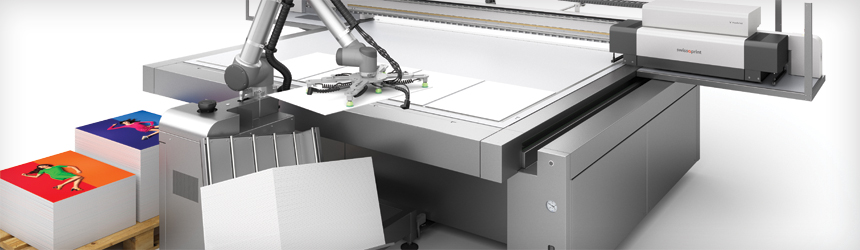
Above: swissQprint offers loading/unloading robot, Rob—fully integrated into the swissQprint printing system and controlled via output software.

Raising Productivity
Implementing either inline or offline automated media handling devices in a digital print environment increases productivity. This is true in regards to corrugated boards, as their cosmetic construction makes manual handling challenging at times.

“Automated handling of corrugated print is a really good opportunity because it is so repetitive and relatively quick to cut or finish. If not automated, this places a significant strain on employees,” shares Steve Aranoff, VP marketing and business development, MCT Digital. In his experience, a sheet feeder for flatbed finishing has been called “my most productive employee” by many customers as “it paces the production and does not take rest breaks.”

Particularly for PSPs offering short-run corrugated jobs, additional automation is deemed the most beneficial. “In digital print, the typical workflow is often based on short-run jobs where requirements to materials and finishing equipment downstream vary. If the PSP offers shapes and three-dimensional corrugated applications by a cutting table or other finishing elements/equipment, an offline material handling solution offers the flexibility and productivity required,” explains Chris Rogers, solution marketing manager – folding carton/corrugated, Esko.

“For providers offering short-run corrugated in the point of purchase (POP) display and packaging markets, automation allows their staff to focus on other tasks,” agrees Heather Roden, strategic account manager, graphics/packaging, Zünd.

Another benefit is stability. “Automated handling for substrates adds consistency in the sense that automated handling has a defined amount of time to move a sheet, and as a result, it gives operators control of anticipated productivity,” suggests Becky McConnell, product marketing manager, Fujifilm North America Corporation, Graphic Systems Division.

With an automated material handling device, a PSP is prepared for the unexpected. “It optimizes utilization of the printer. After all, additional and unmanned shifts may be added. Although the output is boosted, there is no extra labor cost,” adds Mike Kyristi, president, swissQprint America.

Another Puzzle Piece
Print providers should be aware of challenges when it comes to material handling devices. It isn’t as simple as purchasing the hardware, linking it to a printer or finisher, and pressing the red button. Thought about how it will fit into the existing space and what work it will primarily execute are important considerations.

“A company should look at the entire production process so that files, material, and people are optimally used. Think about the space for example, adding material automation changes the way physical sheets move through production, which again might impact material stock and transport, efficiency between devices, and the pack/ship area,” recommends Rogers.

Roden cautions that in terms of fully automated workflows, an important aspect to consider is how well other components, such as the available tool configurations on a cutter, lend themselves to automated, hands-off operation.

According to Kyristi, it is important that the material handling device is fully integrated into the workflow. Ideally, the printer and material handling device should communicate to each other so the operator only needs to worry about one control system.

A material handling device should be robust enough to handle corrugated board. “Because corrugated boards are subject to the environment, warping or bowing is common and the engineering of the handling system needs to overcome the curve of the sheet. Also, like many substrates, any damage to the side of the stack could result in issues either through the handling system or through the printer, depending on the technology,” shares McConnell.

PSPs should also look at job flexibility. “Some installations may want to incorporate board/sheet feeding for some jobs and roll feeding for others. Having both feeders able to be rolled away easily by personnel is a real plus,” advises Aranoff.

Optimum Automation
Material handling devices are used for both the front and back end of a printer and/or finishing device. Adding multiple material handling devices—if the budget and shop space can justify it—provides top efficiency. Stacking, picking, loading or unloading, feeding, sorting, and aligning are all functions with automation possibilities.

It’s all about user preference. For example, for corrugated printers in POP display, Roden says they prefer to configure their finishing devices for tandem production instead of automated material handling.

“While the tandem setup requires more manpower—with manual loading/offloading on either half of the machine—it provides the fastest processing scenario since the cutter is operating continually—even while loading/unloading is taking place on the other side,” she explains.
“In general, having both loading and unloading is preferred as the work synchronization is optimized. But, where it makes sense to add automated material handling depends on each individual PSP’s volume and load balance,” adds Rogers.

John Kuta, president, BDT Print Media North America, argues that automated media handling devices are required on the front and back end of digital printers, and those stackers must be able to accept the full range of media printed or finished.

In particular, for corrugated boards, McConnell suggests that it is helpful to have an automated off loader to go along with the automated loader for substrate handling. “This will ease in post-print processes like finishing, whether it be digital or die cutting,” she explains.

Kyristi believes the optimum solution is to have a material handling device on both the front and back of a printer. “The printer can then work in tandem mode, while printing is in progress on one side, the robot on the other side is unloading or loading and vice versa.”

Scheduling a Time
A material handling solution can be implemented right away or after the print provider has been up and running for a bit. This is true whether a printer or a cutter is the element adding the automation.

Adding immediately is a popular approach. For one reason, if integration is done correctly, the rewards are rich. “A sheet feeder for a cutter significantly reduces labor and increases productivity at less than the cost of a single employee for one shift. It is a worthwhile purchase right away due to the easy payback,” suggests Aranoff.

“There is a lot to gain by implementing it right from the start if investments are done to deal with large volumes. It’s about shop floor planning, overall material flow, and how you set up the entire production workflow,” recommends Rogers.

According to Roden, higher volume producers often opt for installing material handling devices at the same time as a new digital cutter.

Run lengths are a factor. “Typically for corrugated production, run lengths warrant an automated handling system and the return on investment is pleasing but the production workflow and how jobs move through the facility/manufacturing needs to be weighed as well,” admits McConnell.

Alternatively, Kyristi cautions that for some PSPs, it may be a good idea to purchase and implement a printer or cutter first, watch how it’s running, and decide what part of the process requires additional automation. “It is crucial that a PSP understands the process that they actually want to automate,” he explains.

Handling Devices
BDT developed a proprietary technology, Tornado, based on a vortex of air to replace suction cups or grippers that are typically found in corrugated and box board printing and finishing systems. With the technology, BDT develops systems that process substrates from standard papers to boxboard and corrugated cardboard.

According to Kuta, historically the providers of analog corrugated presses and finishing systems utilized in-house designs and standard technologies to create media automation. “For digital corrugated presses and finishing systems, we are seeing a more collaborative approach being used in which specialists are being brought in to add new technology and approaches to media handling automation.” For example, BDT’s media handling systems are found on printers from EFI and HP, Inc.

Esko offers material handling options for its Kongsberg cutting tables. An automatic robotic production system is available for cutting tables equipped with multi-zone capability. A robotic arm loads and unloads table zones quickly. The solution includes infrared laser scanner technology, which protects the operator and reduces the need for physical safety fences.

In addition, sheet/board feeders—i-BF—feed corrugated, paper core boards, and plastics quickly and accurately from a pallet to an Esko Kongsberg cutting table. The feeder can also be used in conjunction with a roll feeder for flexible materials without having to exchange the board feeder.

Fujifilm sells the Inca Onset X Series and part of it is the Inca Onset X3-C, specifically designed for flatbed corrugated printing. The printer can be setup to reduce manual change out of materials with an optional 3/4 semi-automatic handling system, fully-automated Hostert Pro GmbH feed system, or fully-automated robotic material handling system.

MCT offers automated board/sheet feeders available in 1.6 meters width by 3.2 meters length or 3.2 meters width by 1.6 meters length. In its fourth generation, the sheet feeder is robust and simplistic in design, capable of lifting multiple materials without changing suction cups when paired with the MCT VersaTech2 flatbed cutters. Pallets can be placed under the loader from any side or end that the user chooses.

swissQprint offers loading/unloading robot, Rob—fully integrated into the swissQprint printing system and controlled via output software. Rob can be added or removed at any time, which allows the swissQprint printer to remain accessible and versatile. In addition, the robot can be docked on either side of the printer to automate whichever end requires it depending on the job. Two Robs can run at the same time.

Zünd cutters can be configured with semi- or fully-automated material handling devices. The products are built with modularity and scalability in mind, so automation components can be installed at any time. Pricing depends on the configuration and size of the final cutter. For semi-automation, the cutter can be configured with a Board Loading Device in combination with table extensions to allow quick and accurate board placement.

For full automation, the Board Handling System (BHS) requires minimal manpower essentially limited to pallet loading and unloading. Roden says that the BHS can be used on the load and offload side or with a table extension for stripping and sorting instead of automated stacking on a pallet. Integrating a robotic picker/stacker, like Zünd’s collaborative UR robot, also maximizes system automation.

Handling Media
Automated material handling functions include stacking and picking to loading or unloading, feeding, sorting, and aligning. Devices are placed on the front or back end of both printers and digital finishers like a cutting table. For optimum results—if necessary—multiple devices are used at once. Material handling devices, specifically those designed to handle corrugated boards, are ideal for PSPs looking to increase productivity and save time.

May2018, Digital Output

Ground Decor

By Olivia Cahoon

Outdoor floor graphics provide décor and directional assistance for advertising, athletic events, retail, and short- and long-term events. Unlike indoor floor graphics, outdoor media withstands temperature changes, precipitation, UV glare, and increased human and vehicle traffic. Commonly applied to textured surfaces like concrete and asphalt, outdoor floor graphics incorporate safety concerns and anti-slip properties.

Above: Ritrama’s Floor Talker base vinyl film is complemented by an embossed overlaminating film with anti-slip properties.

High Visibility
Outdoor floor graphics communicate to customers, clients, visitors, and the workforce while withstanding high-traffic areas. Digitally printed floor graphics are customizable by shape, size, and color to attract pedestrians and offer versatility across industries including retail, public spaces, and schools.

“They are highly visible to pedestrian areas and offer a way to communicate a variety of messages like promotional, safety, and logistical directions,” offers Jessica Stone, marketing specialist, Ritrama Inc. Digitally printed outdoor floor graphics include two components—the print media and overlaminate—used independently or together.

Sidewalk graphics, a popular form of outdoor floor graphics, display advertising messages on asphalt, concrete, and brick. Strong adhesives adhere to porous surfaces with easy removal, anti-slip characteristics, UV protection, and abrasion resistance. They are applied near malls, concerts, sports venues, and special events like marathons and parades, comments Jonathon Gerlach, U.S. marketing manager, intermediate films, 3M Commercial Solutions.

“Outdoor floor graphics offer businesses and brand owners an opportunity to extend messaging and take advantage of unused real estate with areas of high pedestrian traffic,” explains Gerlach. In retail, they communicate short-term sales and upcoming events, especially in areas cluttered with advertisements and visual promotions. “Graphics placed outside of the store entrance may be the first thing a customer sees and thus the messaging could have a greater impact,” he suggests.

According to E. Tyler Reich, director of product development, Que Media Inc., companies pay a lot of money to make their advertisements obscure so people remember them. “This is because we are inundated with advertising everywhere we go, which desensitizes us to our surroundings. The placement of an advertisement in a non-traditional ad space helps to separate a company’s advertisement from the competition,” he continues.

Temporary safety messages are displayed as floor graphics for workers in construction and manufacturing. “It’s as simple as the fact that while people walk, they focus on the ground in front of them,” admits Kevin Beckerdite, product manager, surface protection and graphics, SWM International. Used for short and long term, floor graphics offer easy removal and directional assistance.

The safety instructions applied to the floor appear in factories, plants, and production facilities. “Floor graphics are used in manufacturing facilities to get workers to pay attention in potentially dangerous places,” says Jeff Stadelman, marketing manager, distributor products, Mactac Distributor Products. Pedestrians look down while walking, which results in an increasing number of vehicle and pedestrian accidents. So much so, Stadelman says many outdoor malls use floor graphics and directional signage at sidewalk and roadway intersections.

Outdoor Media
While floor media is available for indoor and outdoor use, outdoor-only products address unique ground surface challenges like dirt, debris, texture, and environmental elements.

Unlike outdoor surfaces, indoor floors are smoother with materials like wood, linoleum, tile, and finished concrete that require less costly standard adhesives. “Products designed and qualified for outdoor surfaces are highly engineered, which increases price,” explains Larry Delesio, graphic media business manager, DAF Products Inc.

Outdoor floor media and mounting adhesives are designed for difficult surfaces like concrete, carpet, or tile. To select media with proper adhesion strength, Brian Biegel, marketing communications specialist, D&K Group, advises print service providers (PSPs) to know the graphic’s intended location prior to installation. “Outdoor floor graphics are typically exposed to more UV light and adverse weather than an indoor graphic, anything placed outside must be able to withstand these conditions,” he continues.

In addition to graphic protection, weather-resistant floor media also protects pedestrians. Darren Speizer, VP, sales and marketing, Drytac, warns that media and overlaminates become slick with rain or snow and pose a fall risk—leaving business owners and PSPs responsible. Outdoor floor media with conformability properties mold and adhere to rough surfaces to prevent injury and damaged graphics.

To keep graphics and pedestrians safe, outdoor floor media requires durability in several forms. Shaun Jaycox, product manager, S-One Holdings Corporation, recommends PSPs consider floor media strong enough to withstand direct sunlight, ice, and human traffic. “Intense heat can turn a graphic into a soft ooze and ice can cause it to crack, chip, or flake,” he explains. Digitally printable media features temperature use ranges between -5 and 200 degrees Fahrenheit.

The graphic’s intended geographical region determines the type of durability required. According to Jaycox, some multipurpose products don’t hold up to application surface or location needs, especially outdoors. Outdoor floor materials should include weather-ability for light, moisture, temperature, and print surface based on the graphic’s location. To extend the graphic’s life and meet safety regulations, Jaycox recommends a protective laminate and bond adhesive.

Outdoor floor media can be used for indoor applications but is usually not preferred. “They have a price premium that makes it undesirable for the indoors as they can be twice the cost comparatively to indoor floor graphics,” shares Speizer. In addition to higher costs, outdoor media is designed with strong adhesives to keep graphics in place.

“Many outdoor products have aggressive adhesives that are removed with a pressure washer or heat gun and a blade,” says Mark Six, technical product manager, wide format solutions, The Mosaica Group. Most retail locations don’t use strong adhesives for indoor use because removal is messy and difficult, he believes.

To keep outdoor floor graphics in place, floor media should be short and thin. “People tend to drag their feet a lot so the more thick or tall a floor graphic is, it’s more likely someone will trip on the edge and help peel it from the floor,” adds Six. Digital media for outdoor applications typically ranges in thickness from four to 6.5 mil.

Safety First
Floor graphics are applied in one- or two-step systems. A one-step system includes a durable vinyl media while two-step systems use a durable media and laminating film. Laminating films protect printed images from outdoor elements like weather and foot traffic.

PSPs prefer two-step systems for the added durability required in outdoor use. Although some media does have features like slip certification and UV protection, Cory Jones, associate product manager, wide format equipment and supplies, GBC & SEAL, believes the overall application is more durable with an overlaminate protecting traditional vinyl media.

Overlaminates for floor applications offer scruff and scratch resistance, transparency, and durability to withstand weathering. Before selecting an overlaminate, it’s important to know if it is intended for outdoor use. Indoor overlaminates offer resistance to dirt and durability for cleaning floors but don’t apply as well to concrete and asphalt like ceramic, marble, waxed vinyl, or wood floors.

“Two-step systems are really more desirable because they last longer and stay more vibrant and unscathed during the life of the advertisement,” explains Reich.

A one-step method can be efficient for short-term outdoor floor graphics, says Stadelman. “If the graphic is down for a week, some wear from foot traffic will occur but it’s minimal.” He recommends graphics used for more than three months include a slip-resistant laminating film for protection.

It’s important outdoor floor graphics prevent and protect consumers and pedestrians from falling or tripping. Property owners face high risks for inadequate flooring, which affects the PSP’s reputation as well. Anti-skid laminates offer added protection and walking friction.

Textured flooring surfaces with enough anti-skid properties don’t require an additional anti-skid laminate, offers Craig Campbell, market manager, graphic products, ORAFOL Americas. “PSPs should perform their due diligence and check with local municipalities to learn about specific regulations,” he suggests. For outdoor events, PSPs should verify insurance requirements with clients.

Testing procedures advance to improve durability and safety as new slip property risks are identified and better understood. “Anti-slip properties are even more important in exterior applications than in dry interior applications,” adheres Stadelman. It’s critical for media manufacturers, PSPs, and property owners to maintain new specifications and keep apprised of building code changes.

A Specialty Product
Considered a specialty product, floor graphics are found in locations like malls, schools, downtown areas, and zoos. With a presence in daily advertising and activities, floor graphics are becoming a popular means of advertising and décor.

Timothy Schoenbeck, wide format business development manager, Kernow North America, believes the everyday use of floor media should be a sign of how mainstream it has become. He offers, “you cannot go to a retail or grocery store and not come across some sort of floor graphic. Even now, seeing floor graphics in restaurants, sports venues, and even walking down the sidewalk is commonplace.”

Today, floor graphics offer more than retail advertising and special event décor. Schoenbeck says the newest trends and advancements in outdoor floor applications include three-dimensional characteristics, illusion graphics, directional signage, and marathon and 5K advertisements.

From a manufacturer’s standpoint, Campbell encounters floor graphics daily, however, the end user may not understand all the available opportunities that floor graphics offer. He sees it as an excellent method to increase the PSP’s value, educate clients, and find new business. “Advertising agencies and PSPs really see the value these graphics provide and the unlimited space to place an advertising message. This trend will likely put floor graphics as a must for any outdoor advertising campaign.”

Optimal Flooring
Before offering outdoor floor graphics, PSPs should fully understand the project, customer expectations, and requirements to successfully install in an outdoor environment, recommends Bill Rothe, national sales manager, Better Life Technology LLC. He suggests PSPs consider longevity, performance, minimum and maximum temperatures, weatherability, and adhesive.

“Outdoor floor graphic material should be easy to apply, durable, easy to remove, and weather resistant,” adds Rothe. To ensure a compatible media is selected, PSPs can run test trials for durability and appearance.

Matt Buckley, director of business development, wide format, GPA, says PSPs should consider the durability level to meet the customer’s expectations—whether the project is short or long term, and the location to ensure it’s a clean, dry surface at the correct temperature. Installing floor graphics during or after poor weather conditions, like in rain or snow, interferes with the graphic’s installation and impairs durability. Floor graphics should remain durable, visual, and intact for the client’s requested time.

Vehicle safety is tested on floor graphics placed in vehicle traffic. According to Buckley, most outdoor floor graphics endure light traffic, but if a vehicle turns on the surface, it creates more torque, which damages the graphic and causes it to lift. Floor media should be durable and strong enough to withstand heavy items without distortion or adhesion loss.

Wet environments not only pose safety risks but also affect the graphic’s visibility. In wet environments, Kylie Schleicher, product manager, Ultraflex Systems, Inc., explains that clear products can cloud with precipitation and recommends an opaque product with a printable first surface and top coat. Clear products also risk clouding under heavy sunlight and work best with opaque products. “Some clear vinyl products can blush in sunlight so it’s better to have a solid product with first surface printing,” she adds.

Floor Décor
Outdoor floor graphics effectively market limited time sales and upcoming events. Floor media for outdoor use features anti-slip properties and lamination to abide by safety regulations while protecting graphics from environmental elements, human traffic, and vehicles. Outdoor floor graphics provide strength and durability to create customizable floor décor.

Apr2018, Digital Output

Categorizing By Application

By Melissa Donovan

With another year behind us, it’s time to look at the state of ink in wide format digital printing. Certain topics continue to be cause for discussion, while others are less impactful than they once were. For example, UV-curable and UV LED inks’ versatility continues to be relevant, especially in light of digital printing’s move into manufacturing environments.

This article takes a different approach compared to previous iterations. Segmented by application—textiles, traditional signage, pressure-sensitive based, and pre-manufactured and packaging materials—we explore how each application category’s preferred ink has evolved, where the demand for this type of ink is coming from, and why the inks mentioned are ideal for the specific application.

Fast Fabric
Textile-based applications include garments, décor, and soft signage. Depending on the type of fabric used and what it will be manufactured into, several preferred ink sets are used in textile-based applications.

According to Nick Buettner, director of global technical sales, Advanced Color Solutions, the overall trend in this space is increased stability. “Meaning more reliable operation without ink supply or printhead issues. The future is for these technologies to include more direct dispersion to textile and hopefully the ability to do so without extensive treatments to the fabric.”

Dye-sublimation (dye-sub) water-based ink is used for digitally printed textiles in fashion and décor. “Many manufacturers of fashion clothing, accessories, and home goods look to onshore their textile printing production with dye-sub water-based ink to reduce lead times, lessen minimum order requirements, improve quality control, and become more responsive to short-lived fashion trends,” says Susie Mendelssohn, Triangle global sales and marketing manager, INX International Ink Co.

The dye-sub process is also attractive for soft signage producers. “For soft signage, dye-sub is becoming the number one choice. It is less complex and overall less expensive,” admits Jack Papaiacovou, VP/GM, Hilord Chemical Corporation.

In recent years, dye-sub has advanced in color and visual quality. “For true, two-sided textile printing applications the preferred ink is dye-sub. It is necessary because the ink becomes embedded in the fabric,” explains Larry Salomon, VP, wide format, Agfa Graphics.

Hasan Bagli, sales manager special applications, OCP, believes it is because dye-sub ink creates vibrant colors using less ink due to high dye concentrations.

Pigment-based ink is also popular for textile printing, specifically of garments, where the fabric versatility is vast from cotton to velvets and silks. “For most other fabrics besides polyester, dispersed pigment is the current leader. Minus some new technology making it easier to dye natural fabrics, dispersed pigments continue to improve,” foresee Randy Anderson, product manager, dye-sub and direct to textile printers and David Conrad, director of sales and marketing, Mutoh America, Inc.

“Advantages of using pigment inks include fabric independency, required pre- and post-treatment is minimal, and light fastness is superior,” suggests Nitin Goswamy, president, A.T. Inks.

The improvements in washability and hand are other reasons, according to Juan Kim, CEO, Valloy Incorporation, that pigment-based ink remains prevalent in the production of garments.

“New developments with pigments and binders tailored specifically to textiles give chemists and formulators better raw materials to work with and now some very good pigment textile inks are available,” shares Heather Rockow, business development, Kao Collins Inc. The company’s pigment ebeam inks, due to the ebeam process, are ideal for use in clothing where ink migration is a concern.

Acid dye ink is an option for printing to fabrics that may be subjected to outdoor elements. “For garments and décor, we see great usage of acid inks. They provide superior outdoor longevity compared to dye-sub ink,” points out Papaiacovou.

Outside of the traditional practice of using dyes and pigments for textile printing, John D. Peterman, executive VP sales and marketing, Big Systems, LLC, argues latex ink impacts this market segment. “With an 11 percent growth in soft signage expected to continue through 2020, the demand is there. With the advent of new durable, printable textiles, latex-printed materials provide great cost savings and durability.”

“When latex ink was initially launched, it was mostly used for banners, wraps, and retail signage; but improvements in ink technology, such as improved waterfastness and scratch resistance have continued to open new markets for latex,” agrees Sandy Gramley, AMS category manager, latex supplies, HP, Inc.

As for demand, the manufacturing process for textile-based applications is changing. “For apparel, for example, clothing companies need the type of flexibility that you typically see in fast fashion, where designs are created and brought to market in weeks instead of months. From an ink perspective, the durability and vibrancy of our inks are key in those applications,” explains Stephen Emery, VP, ink business and new business development, EFI Inkjet.

Amy Hohenadel, laboratory manager and Holland Weber, marketing and design coordinator, Polymeric US, agree that new applications are driven by industry trends in addition to customer requests. “New avenues for dye-sub, weatherable digital inks/coatings, and inks for markets that were screenprinted and combination mercury vapor/LED curing are all projects that are the focus of Polymeric’s research and development laboratory.”

Original Work
Traditional signage such as banners, trade show graphics, and outdoor signs were some of the first applications produced on digital printers. Because of this, they utilized several iterations of ink sets from solvent, to eco-solvent, latex, and UV.

Within all of the applications mentioned in this article, Mendelssohn says traditional signage is probably the oldest, dating back to the 1990s. “Inks used at that time had an extremely high solvent content and durability.”

“In the past inks were made with harsher organic solvents and then moved to mild solvents and now most of them are made with eco-solvents, which are safer for the environment and formulated to perform the same or better than inks made in the past using full solvents,” agrees James Schall, founder, Budget Inks.

Josh Hope, senior manager, 3D printers and engineering projects and Tommy Martin, product manager, textiles and apparel business development and marketing, Mimaki USA, Inc., explain that eco-solvent and solvent inks still present the most versatile opportunities for general graphics intended for indoor or outdoor use. “The introduction of expanded ink colors such as orange and light black combined with improvements in substrate compatibility create an increased demand.”

Durability in terms of wear and tear and fade resistance is important for any ink set used in traditional signage. Anderson and Conrad believe eco-solvent ink is primarily used in applications like banners, trade show graphics, and outdoor signs because of this.

“The color gamut on eco-solvent remains most encompassing to give better depth and color clarity to images printed for indoor and outdoor applications. The durability and color vibrancy of eco-solvent ink remains superior for installations where high traffic may be present or where detailed imaging is required,” they continue.

Latex is commonly considered for its “green” attributes in addition to substrate diversity. “Concerns about volatile organic compounds (VOCs) and related odors and potential health risks cause many to shift to either latex or eco-solvent ink. The signage market will continue to be anchored in a combination of both latex and UV based on sheet applicability across the largest variety of substrates,” shares Dan Johansen, marketing manager, wide format solutions, commercial and industrial printing business group, Ricoh USA, Inc.

Similar to latex, as pointed out by Johansen, UV-curable and UV LED ink offers limited VOCs and a wider range of printable substrates. Becky McConnell, product marketing manager, Fujifilm North America Corporation, Graphic Systems Division, sees traditional signage providers turning to UV printing to address the faster turnarounds demanded by brands and clients.

“UV inks of today are increasingly resistant to UV sunlight and in many cases go without additional lamination. UV-curable inks continue to evolve with formulations allowing for greater flexibility and adhesion to multiple substrates,” adds Mendelssohn.

The demand for UV ink used in the creation of traditional signage is based on “fast turnarounds and short run lengths due to versioning and smaller markets. The ability to print and immediately cure offers the benefit of getting to finishing and fulfillment as quickly and efficiently as possible,” explains McConnell.

Thinking ahead, Buettner sees the ingredients of the ink sets used in this market segment to migrate away from regulated toxins and chemicals.

Sticking To It
Pressure-sensitive applications include wallcoverings, vehicle wraps, floor graphics, and window graphics. UV and latex inks are used in this printing process, namely because they work well with thinner, somewhat more difficult substrates that make up the final product while still offering a quality appearance. Eco-solvent ink is also still used.

“For decals, stickers, and labels, supported film or paper features different shrinkage with a base material in most cases. UV LED ink with its low level of heat generation is ideal for this kind of application and starting to dominate the market,” suggests Kim.

Peter Saunders, business director – digital, Sun Chemical Corporation, shares that most of the inkjet inks the company sells today for pressure-sensitive applications are a wide spectrum of conventional UV-curable, but there is significant growth in UV LED.

UV and latex are used for the majority of pressure-sensitive based work according to Johansen because of their immediate finishing capability, options for ink flexibility, and large color gamut. “The biggest difference is the significant move away from solvent or even eco-solvent to UV or latex inks because of their quick dry capabilities as well as the ink technologies’ ability to support the best balance of color, substrate flexibility, and color longevity.”

Peterman addresses latex’s quick dry capabilities specifically. “The ink is cured as it exits the printer and can be finished or laminated immediately. Decals and stickers can be printed full bleed and contour cut without waiting for curing and outgassing, and won’t suffer from edge curl and shrinkage. The inks are much more scratch resistant as well.”

Other water-based technologies are slated to have an influence in this segment. Dr. Simon Daplyn, marketing manager, Sensient Imaging Technologies, shares that some water-based technologies are emerging. At Sensient in particular, the company is developing aqueous solutions for non-porous materials. “This technology limits VOCs and is able to form a thin film of ink, giving maximum color benefit.”

Industrial Styles
From printing directly to furniture or building supplies and promotional items like golf balls, pre-manufactured materials maintain a growing presence in digital print. Packaging applications like corrugated and flexible also hold a large stake.

UV flatbed digital printing positively impacts the promotional and awards production market. “The ability to add color and to mass customize objects enable promotional product printers to take on short run/custom color jobs that were not financially feasible using screenprinting methods or even possible using engravers,” share Hope and Martin.

“Because of UV ink’s ability to have both strong adhesion and flexibility, it expanded options for pre-manufactured materials and packaging materials. UV’s ability to be cut and finished, allowing for the inks to flex around the edges, makes it ideal for packaging and prototypes and short-run packaging production,” recommends Johansen.

For packaging production in particular, Lily Hunter, product manager, textiles and consumables, Roland DGA Corporation, points to faster curing times and white and gloss inks as specific benefits. Anderson and Conrad explain that UV LED provides the ability to print using clear varnish, which provides a raised surface look that mimics textures.

Although UV ink is considered somewhat safe, for packaging that is directly in contact with food, water-based ink sets are being studied closely. “In packaging materials, I think the systems are not yet mature, but it seems water-based inkjet inks will be the ink system of the future,” foresees Pedro J. Martinez, CEO, Afford Industrial.

“Specific to food packaging, many ink companies produce low migration UV and LED inks. However, as government regulations become stricter, ebeam inks will become the ink of choice. Using ebeam inks and ebeam curing, food packaging producers can eliminate risks associated with photo initiators, migration, and VOC emissions,” adds Rockow.

One other application in this category is those produced via thermoforming. Graphics can be printed digitally and then thermoformed into a sign or automotive part if the correct ink is used. Javier Mahmoud, VP of sales and marketing, CET Color, says the company may release a flexible UV ink because of the demand.

Broad Ink
Ink vendors realize there are many applications that traditional print providers can now offer customers and want to offer a versatile ink set. Non-traditional print environments—like manufacturing facilities—also look for flexibility in ink. However, it is difficult to create a universal ink, so chemists continue to tweak and advance existing formulations based on applications.

“Choosing the right ink for the application is critical to accurate and consistent color managed printing,” stresses Salomon. Agfa invests significant time, energy, and research into establishing an ink product line that is consistent and reliable to meet customers’ printing needs.

Fujifilm constantly develops new and improved ink formulations for specific applications through various means of printing. The team works with user feedback and industry experts to anticipate the needs of the market to develop products that advance the industry, according to McConnell.

HP works closely with its customers to improve existing latex ink and understand what new directions they would like to take the technology.

At INX, ink formulation previously revolved around specific printheads and printers. “Now, due to the variety of applications in the market, we tend to develop to applications and then adjust as needed for specific printheads and printers,” shares Mendelssohn.

“Polymeric is unique in that it has the capabilities of turning customer requests into products in a relatively short period of time. Our chemists have full ownership of projects from beginning to end instead of going through a multitude of departments to finish an ink system. This shortens development time and gets product to market quicker,” say Hohenadel and Weber.

The substrates and requirements of ink performance are so different, admits Saunders, that Sun Chemical has separate research and development groups working on the needs of each application. “The common factor is that the inks all need to jet and function reliably, so the understanding we have gained of the influence of ink chemistry on the physics of inkjet printing is essential in all ink development.”

Striving for Efficiency
Textile based, traditional signage, pressure-sensitive based, and pre-manufactured and packaging materials are broad headings with hundreds of applications found in the scope of digital printing.

The ink sets vary but as advancements in chemistries progress there is an important theme across all of the applications. Whatever is printed, customers want finished products quickly. Ink sets must offer outgassing or drying capabilities that do not inhibit the production cycle in any way, while also providing a level of quality the customer is accustomed to.

Apr2018, Digital Output

Package Creation

By Elizabeth Quirk

Today, print service providers (PSPs) looking to enter into digitally printed packaging need to consider the automated routers and cutters required to successfully complete the process.

In this article, we discuss the end process of digital finishing for package printing and why digital, automated routers/cutters are a necessity for handling even the most robust packaging materials, like corrugated surfaces or substrates.

Above: Finished standees cut on a DGS router/cutter device.

Why Digital
Many PSPs already employ some type of finishing device, whether it’s a manual cutter or fully automated system. The strategy of entering into the digital packaging market is one of the methods PSPs can use to elevate their printed material from a commodity to a higher level price point. Any time a printed square or rectangle is post-processed with intricate cutting, creasing, or folding, it garners a higher profit.

By having a digital, automated router or cutter involved in the process, it makes the job easier and gives the company a competitive advantage. Plus, with the explosion of digital print as a viable technology, the industry benefits from shorter runs, more customization, and regionalization.

Heather Roden, strategic account manager, Zünd, believes this when she says the consumers in the North American market respond more readily to customized packaging, and marketers tend to keep campaign cycles shorter to retain buyer attention.

“Digital packaging is an ideal answer to these market demands. We have found the versatility and productivity of Zünd cutting systems to be advantageous to a variety of PSPs, including those who cut flexographic plates, coating blankets, prototypes, and short-run packaging,” adds Roden.

Automated routers/cutters provide better accuracy and end results compared to manual cutting. They permit perfect finishing for all rigid substrates, and for new or poorly trained workers, this is extremely helpful.

Aimee Heuschkel, director of marketing creative services, Gerber Technology, believes PSPs should invest in digital, automated routers/cutters because of the labor savings, improved quality of the finished product, flexibility, increased profit, and the ability to expand into new market opportunities—such as industrial part manufacturing.

“Plus, it provides the ability to accept jobs from other PSPs that don’t have digital cutters. The competitor becomes the customer,” suggests Heuschkel.

The versatility of these automated machines are crucial. Digital cutters accept multiple tools and are used for corrugated, cardboard, wood, plastic, cutting, routing, and creasing.

Help at the End
The end result is not the print itself, but a finished product that has been properly cut, and perhaps sealed or laminated, before it is delivered to a client. With wide format printing, and materials from digitally printed fabric, to plastics, to wood, and even metals, routers/cutters fit the bill.

It’s much easier for a PSP to take a job off a printer and immediately place it on a digital finisher, overseen by software that drives the printer with a PDF file and finisher with a corresponding cutting file, admits George Folickman, director of business development, digital finishing, Esko.

“Plus, there is no waiting time for rush jobs, very accurate and clean work can be done with the right finishing table,” he adds.

With a digital, automated router/cutter PSPs easily provide a complete end-to-end solution. From print to finished product; turnaround time is shortened,.

Roberto Rodriguez, president, DGS – Digital Graphic Systems Inc., believes a digital, automated router/cutter has a fast return on investment (ROI) since it lets the PSP sell applications with added value.

“On the other hand, it helps create three-dimensional (3D) structural designs, point of purchase displays, and trade show booths, which are not sold by the square foot. This increases the margins substantially. In the case of simpler applications, the equipment increases repeatability and efficiency in the production process,” explains Rodriguez.

A digital cutter is ideal for complementing traditional processes, for example digital prototyping. According to Josh Hope, senior manager, 3D printing and engineering projects, Mimaki USA, Inc., they can “help the agency or customer requesting the prototype to move from design to finished concept within minutes, using the exact packaging materials that are intended for final use.”

Roden describes prototyping as an area where digital cutting assists both traditional and new digital methods for creating packaging. “Designers can test shapes for functionality, appeal, material endurance, as well as structural support in protecting contents,” she continues.

Lastly, a digital, automated router/cutter allows the PSP to make unlimited shapes and structural elements with added value.

Guide to Buying an
Automated Router/Cutter
While in the process of looking for a cutter/router, Hope suggests keeping a close eye on functionality and size. Pay attention to if it has the necessary functions to cut/trim the majority of jobs, or if the cutter needs to be at least as big as the largest job, making office space a consideration as well.

Avoid the “build and they will come” way of doing things, advises Javier Mahmoud, VP of sales and marketing, CET Color.

“Make sure you first have the work to feed a cutter. Also, automation is two staged. One, once the product is cut, the belt that the product was on will advance so you can load the next piece. Stage two is automated media handling. This can always be added onto later,” he explains.

For those looking for a table to cut corrugated or heavy-duty substrates, the strength of the platform and lifespan are important considerations as well, shares Folickman. “The tools need to be well tested to provide v-notch cuts to honeycomb materials, as well as offering specialty tools for cutting materials such as foam.”

For PSPs, software matters as well. Robert Marshall, director of marketing, AXYZ International, argues a fast and accurate camera registration system is an essential to ensure perfect alignment of printed materials within the cutting program.

Folickman believes vendors that provide turnkey solutions offer a way for PSPs to be as efficient as possible with their equipment because of its structural design and workflow management capabilities.

“Esko’s ArtiosCAD, for instance, provides PSPs a lower bar of entry for packaging and displays. You do not need to be a seasoned packaging engineer to offer creative designs. PSPs can purchase a design, add graphics in Adobe Illustrator, and very quickly show virtual 3D or hard proofs to the customer,” he explains.

Steve Aranoff, VP business development and marketing, MCT Digital, believes that its company’s all-in-one approach for laser cutting and sealing of fabric, laser cutting of acrylic, etching on many materials—even ones that cannot be cut, such as ceramics and stone—on a single system with full automation capability, puts a PSP into the position of virtually never having to turn down a job.

“While the VersaTech2 is not a so-called entry-level solution, the fact that cutters last 12 to 15 years compared to an inkjet printer’s three years, means that operators can be trained to use—and be comfortable using—a more versatile cutter for a longer period of time. Many customers have found that a VersaTech2 can be justified on doing just a week’s worth of cutting in a month, but many with higher throughput requirements can pay off a system in seven months or less” adds Aranoff.

Heuschkel explains that when looking at a digital, automated router/cutter and its ROI, many different analyses need to be done. Consider cut quality, ease of file conversion, time to cut, reliability, ease of use, ability to expand capabilities, footprint, software compatibility with existing and future software, file import and export, and ability to present print/cut concepts to customers for proposals.

Robotic Arms
A combination of router/cutter and material handling technology has advanced immensely over the years, and is now able to be leveraged in terms of automation.

“To compete in this environment, graphic industry finishers should be able to work faster and offer more flexible cutting particularly in their use of harder, rigid sheet materials. Hybrid technology has been designed to respond to these growing needs,” argues Marshall.

Heuschkel agrees, saying it seems like a no-brainer to automate more steps in the process. But warns the cost and ROI of the automation need to be weighed against other investment opportunities.

Manually handling large sheets is tedious, and assuming that production levels are adequate, utilizing an operator is less efficient and cost effective than a machine.

Folickman believes the technology of finishing tables has reached a point where there are diminishing returns trying to increase machine speed. However, he argues, “there are still extraordinary efficiencies by reducing the inactive time a table experiences as it waits for a finished sheet to be removed, replaced by a new one.”

“For instance, utilizing the multiple vacuum zones on a finishing table, a robotic arm can keep a table cutting almost every second. While a sheet is removed and replaced on one side, it immediately begins cutting the robotically placed sheet on the other,” explains Folickman.

Advances in robotic technology minimizes worry of cutting mistakes. The downfall of this, however, are companies whose print capacity is not enough to keep the automation tools working. In this case, the cost of entry and the space requirements can pose a challenge.

Zünd offers two solutions—a sheet/board cutter that utilizes vacuum grippers to advance paperboard/cardboard, and the Board Handling System – BHS, which is fully automated for corrugated materials in conjunction with a dual-beam 3D system.

“Because our corporate philosophy is to have an open system, we integrate with a variety of automation enhancements involving robots. For example, packagers can systemize board feeding via a robotic arm picking up sheets from a completed printer skid and placing them on the cutter for processing. Because robots can be programmed to sort pieces into different piles, this makes post-process kitting even easier,” says Roden.

End Process
Printing technology has changed considerably in recent years. Rather than be limited to printing on paper and vinyl, it’s now possible to print directly to a range of different substrates. Traditional print finishing tables employing only high-speed knife tools are no longer sufficient. In order to see the end process of digital finishing for package printing go smoothly and successfully, PSPs should weigh the benefits and add digital, automated routers/cutters into their shop.

Apr2018, Digital Output

Tallboy Tank

By Cassandra Balentine

Wide format graphics make a big impact. Beyond traditional signage, innovative brands look at ways to maximize promotional space. The craft beer industry is booming, and many breweries open their facilities for tours and tastings. These environments represent a great opportunity for brands to connect with loyal customers—who will often drive for hundreds of miles and wait in line for hours.

One VT-based print shop worked with a local brewery to enhance its new tasting room with custom graphics. Here, the graphics are part of the experience. With a little creativity and technical know-how, the opportunities to make a lasting impression with wide format graphics are endless.

Above: The Alchemist Brewery and Visitor’s Center in Stowe, VT provides samples of beer for tasting, retail beer sales, and merchandise. The company approached Yipes! of Williston, VT with the goal of making its holding tanks at the Stowe location resemble its popular beer cans. Eco-solvent Roland printers and media from 3M were used to complete the project.

The Print Shop
Established in 1985 by Marshall Learned, Yipes! Auto & Graphics is an automotive and graphics provider based out of Williston, VT.

The company evolved from performing mobile pinstripe installations out of a Volkswagen Rabbit at nearby car dealerships. “The 1980’s were a popular pinstripe period in VT and business was booming,” says Craig Maines, graphic department manager/creative director, Yipes!

The small mobile operation soon transitioned to a brick and mortar storefront and began offering vehicle accessories, cut vinyl, and large format printed graphics. In 2016 Stephen Ferreria, a local Vermonter, purchased the business and currently serves as its president. The facility is approximately 10,000 square feet and houses a staff of 21.

In addition to serving local automotive and printing needs, the business has a nationwide clientele. Its automotive division offers accessories for cars, trucks, and SUVs including remote car starters, bug guards, bull bars, trailer hitches, rain guards, window tints, seat covers, and sun roofs. Its graphics business includes promotional media, graphics design/branding, and paint protection film.

Printed graphics were introduced at Yipes! in the mid to late 1990’s. “The pinstripe business led to premade graphic installs, which led to plotter cut graphics, which led to the need for printed graphics,” explains Maines.

Yipes! operates a fleet of eco-solvent printers from Roland DGA Corporation to produce its wide format graphics. For finishing it employs Roland CAMM-1 GX and Graphtec America, Inc. devices to cut vinyl.

“We chose Roland for is solvent ink and print production software,” offers Maines. He says the equipment provides excellent speed, great resolution, and solvent ink that allows for fully utilizing printed reflective media.

The print provider relies on an array of software, including Adobe Creative Suite for design. For production workflow, it runs Roland VersaWorks production software as well as CADlink Technology Corporation SignLab VinylPro.

The Brewery
VT is home to many craft breweries, putting Yipes! in an ideal position to offer creative branding and promotional solutions for these companies.

Located in nearby Stowe, VT, the Alchemist is consistently rated one of the top craft breweries in the nation. Opened in 2016, the Stowe facility brews one of the company’s flagship beers, Focal Banger, as well as seasonal beers that rotate throughout the year. The Alchemist Brewery and Visitor’s Center in Stowe provides samples of beer for tasting, retail beer sales, and merchandise.

The company approached Yipes! with the goal of making its holding tanks at the Visitor’s Center resemble its popular beer cans. To produce the job, each tank consisted of four to six varying panels at 170 inches tall. “This allowed us to work around tank hardware obstacles and fit in the tight spaces around the tanks,” explains Maines.

The artwork was provided by the Alchemist’s art director and Yipes! tailored the artwork to fit the space and paneled it to contort around hardware without obscuring the client’s graphics.

The graphics were printed on 3M Commercial Solutions’ 3M Print Wrap Film IJ180mC and 3M Controltac Graphic Film with Comply v3 Adhesive IJ180Cv3-10, both laminated with 3M Scotchcal Gloss Overlaminate 8518. All panels were printed on the shop’s Roland printers with Roland Eco-Sol MAX 2 ink. The files were reworked and prepped in Adobe Illustrator and then printed through Roland VersaWorks software.

The Yipes! installation team performed the three tank install. “The only unique challenge that came up during install was at certain hours of the day the tanks would collect condensation, creating a difficult environment for backing paper removal,” admits Maines.

The approval process took just under one month. Following that, the Yipes! team needed to coordinate the installation with the Alchemist’s canning schedule, resulting in installation being spaced out over two weeks. Between approval, production, and install the inquiry came in around mid-October and the project was fully competed the first week of December.

“The project was a ton of fun. It was a great challenge that ended with the desired look and feel the Alchemist was shooting for,” comments Maines.

Brewing Success
It is an exciting time for print providers and brands. In addition to traditional signage, creative professionals are able to truly make an impression with the abundance of media options available today. Those willing to move outside of their comfort zone often produce excellent portfolio pieces that are sure to create a buzz.

Apr2018, Digital Output

POP Setting

By Cassandra Balentine

Wallcoverings present a high-impact branding opportunity. Retail shops and restaurants let their imaginations run wild, as the creative potential for point of purchase (POP) and display wall graphics is limitless.

Depending on the media selected, wallcoverings serve short- or long-term needs with varying installation requirements. This type of graphic is popular for POP and display due to its relatively inexpensive ability to transform a specific area and allow maximum use from a previously unused space.

“Wallcoverings can change an interior space instantaneously, adding dimension and texture to a plain environment,” comments Jaimie Mask, product specialist, S-One Holdings Corporation.

They brighten and energize walls, rooms, or displays. “Using digitally printable wallcoverings is a relatively inexpensive way to add personality and yet a professional way to upgrade a display,” shares Jeff Stadelman, marketing manager, distributor products, Mactac Distributor Products.

Above: Mactac wallcovering offerings are pressure-sensitive, adhesive-backed vinyl.

Display and POP
Custom wall décor is more popular as designers create unique spaces for consumers in stores, hotels, fitness centers, restaurants, schools, and healthcare facilities. “Companies execute branding, corporate culture, or marketing promotions easily by creating specialized wall and environmental graphics. The films are enhanced to reflect color better than ever and easier to install,” explains Cindy Richards, regional technical specialist, Avery Dennison Graphics Solutions.

Matt Buckley, director of business development, wide format, GPA, says versatility is a big advantage of wall graphics. “They can be changed up for different seasons and promotions, or be left up for longer periods if that’s what the client is looking for.”

Wallcoverings have revitalized the POP space, allowing advertisers to make an advertisement appear as a permanent installation even though it is still fully removable and replaceable. “Permanent installation advertising has always given a product that regal or high-quality look and feel. Now this can be accomplished without the expense of a permanent installation via wallcoverings,” recommends E. Tyler Reich, director of product development, Que Media Inc.

Darren Speizer, VP of sales and marketing, Drytac, adds that wallcoverings help elevate the overall look and feel of a space. “Wallcoverings give retailers the ability to enhance their space and convey their brand message in such a way that traditional signage cannot.”

It’s an exciting time for retailers looking to create fresh, inviting environments that captivate and motivate. “Manufacturers want POP options that stop traffic, even if just for a second,” admits Daren Silverstein, president, The CLI Group. “They can reinforce quality points, scream the brand, or simply flood the area with brand images and colors that engage the customer.”

Jonathan Gerlach, U.S. marketing manager, intermediate films, 3M Commercial Solutions, sees a growing trend of a two-pronged approach with POP wallcoverings. “Long-term graphics are placed on the wall and short-term graphics are layered on top and switched out as necessary.” With proper lamination this approach can be cost effective and efficient. He says it’s key to use an overlaminate on the base graphics that can be wiped down and cleaned between applications.

Timothy Schoenbeck, wide format business development manager, Kernow North America, adds that further technical improvements on wallcovering materials offer solutions for changing designs as well as features like protection against mold and bacteria.

Printing and Installation Tips
PSPs should consider the application and the environment where a wallcovering will eventually be installed.

Kylie Schleicher, product manager, Ultraflex Systems, Inc., points out the importance of media durability and longevity of the applications. In terms of durability, many people may run their hands along the graphics. In terms of longevity, determine if the graphics should receive a top coat or laminate.

“Wallcoverings are manufactured in several ways and the end application may dictate the type of substrate used,” suggests Eric Tischer, president, Verseidag US. For instance, in high-traffic applications or restaurants, vinyl/coated wallcoverings are typically chosen. In this case, a more durable substrate and ink may enhance the longevity.

Mark Shaneyfelt, director, sales and marketing, printable textiles, Aurora Specialty Textiles Group, Inc., says understanding the specific installation challenges are important to a successful project. How long will the product be up? What kind of traffic is expected for durability, ease of removal, and cleaning?

Mask suggests considering any environmental requirements in the area where the graphic is planned like fire ratings, Greenguard, LEED credits, and REACH compliance.

The wall itself also plays a role. Tyler Pacheco, product marketing communications manager, Sihl Inc., says the surface the media is mounted on can change the performance and aesthetic of the media if not installed correctly.

“Walls are rarely completely smooth and many materials allow the use of heat to promote adhesion and ensure a solid bond with the wall surface. Because most walls are never cleaned and tend to be a little dusty or grimy, the wall should be tested for adhesion and cleaned before application,” recommends Buckley.

Lily Hunter, product manager, textiles and consumables, Roland DGA Corporation, believes that bumpy walls require higher adhesion than smoother walls. And permanent adhesive is preferred for longer term applications, whereas removable media is a better choice for graphics that are changed frequently.

Consider whether the paint on the wall has low or no volatile organic compounds, what the finish of the paint is, and how long it has been since the wall was painted, advises Richards. “It is important to test all surfaces for proper paint surface finish, paint outgassing, and surface to substrate adhesion and include this in the pricing and time considered for an application estimate.”

Reich suggests running a test swatch on the surface before printing and installing. “It is crucial for print shops to test the media they use—at least a 24×36-inch swatch to ensure the adhesive can hold the weight of the media—before spending the time and money on ink and installation.”

For traditional glue and paste wallpaper installations, “make sure that the wall is prepped with a primer and allowed to dry according to the manufacturer of the primer and paste. This will help avoid bubbles and ensure a smooth finish on the installation,” recommends Anthony Pappalardo, sales manager, North America, Dickson Coatings.

Depending on the media selected and the goals of the application, installation could be simple or complex.

Dennis Brunnett, technical service specialist, FLEXcon, explains that the right media selection may depend on the installer. For non-professionals the product needs a less challenging install. Aspects like thicker films and air egress liners make installs simpler for novices.

“When it comes to wallcovering media, the biggest concern is the actual installation process. Many beautiful printed wallcoverings end up failing because the wrong product was selected for the specific application and wall type,” admits Hunter.

Heather McCusker, wide format product line manager, Agfa Graphics, agrees and says that finding an installer good with handling wallcoverings is sometimes the hardest part of offering this service.

“While many people believe that a standard self adhesive is a simple, cost-effective option, you’ll find that these products are more difficult to install than products specifically designed for wall applications,” cautions Speizer.

Tips and Tricks
In addition to the factors discussed above, wallcovering media providers share tips and tricks for a successful wallcovering.

Silverstein says success is often a matter of collaborating with the designer to develop and edit patterns to minimize material requirements with the aim of saving the client money.

Buckley shares that most products print easily, similar to materials used for other surfaces, such as windows. However, it is important to pay close attention to the position of copy and images for tiling and to allow extra space for overlaps and working the material at the top and bottom.

McCusker agrees, adding that it is not recommended to butt the seams together.

Pappalardo explains that most wallcovering fabrics are 40 to 54 inches wide and need to be seamed. “Make sure the graphic material you use does not shrink or stretch. This creates gaps in the graphic that can be unsightly.” He adds that seamless options are available.

“Using a cheaper material with even a small risk of shrinkage will be a no go, especially as wallcoverings are applied with butt joints,” recommends Schoenbeck. “Using a too thin material will not offer the required resistance for commercial use especially in high-traffic areas. If you need an easily changeable wallcovering you’ll need a non-woven based product.”

Pricing the Project
Wallcovering costs range from economical to high end. “PSPs should price their offerings accordingly. Determining the prices of the wallcoverings is just like pricing any other product or service. There are a number or factors you should consider, including the market, the difficulty of the installation, your material and labor costs, and the expectations of your customer,” suggests Hunter.

Walter Gierlach Jr., president, Photo Tex Group, Inc., points to pricing depending on the size of the job, who is doing the installation, and number of placements. Also, if the graphic is a repeat image and whether or not it requires contour cuts.

Buckley recommends considering the cost of the material, length of the display, proper time to clean and prepare the wall surface, and if trained/qualified installers are needed when pricing out a wallcovering job.

While material costs are always a factor, it is encouraged that customers look at the project costs in totality, says Speizer. “For example, if your material varies from $0.30 per square foot, but your labor goes from $1 a square foot to $3, how important is the material price in the grand scheme of things? To take it a step further, what if your application needs can be met with materials that don’t require professional installation?”

Silverstein cautions against aggressive pricing. “It may be part of the equation, but we feel that there has to be a balance of quality, prompt delivery, and great communication during every step of the production and delivery process. Results count. Keeping promises count, too. Of course, having the ability to print on a range of materials provides the buyer with greater choice. Above all, having knowledgeable personnel available on the phone when changes, issues, or problems arise.”

“Sell the value, not the price and educate your customer on the variety of options out there. Instead of quoting on square foot cost, talk to them about good, better, and best strategies for their graphic approach when building a job. Place an emphasis on the end result and how it will elevate their space,” encourages Gerlach.

Mask warns against comparing street pricing for pre-printed wallpaper you can find in retail to your custom printed digital wallcovering. “It is not an apples to apples comparison. First, the digital wallcoverings base you choose may have a different construction. Second, it’s likely your client came to you because they want a specific image on their walls. If they could find the same thing cheaper in retail they would have already done that. When comparing digital to digital, know your competitive advantages, which include print technology features and benefits, product type, performance, and your ability to service your customers.”

Product Differentiation
Since wallcoverings are a high-value application, competing on price is not always the best solution. Therefore, PSPs need to differentiate themselves in other ways.

Schoenbeck suggests PSPs can stand out by showing a real understanding of the needs and expectations of their customers, choosing the best suitable product for that job, promoting the specific features of the materials, and working on the quality profile of their materials.

Pacheco says PSPs should provide a variety of products. “This gives the provider options and prevents the need of a competitor.”

“PSPs need to be as versatile as possible with regards to their substrate product offerings as well as offer premium printability regarding dpi, vibrancy, and durability,” recommends Tischer. Finishes, spot or post coatings, quick turnaround times, and a flawless installation are other ways for PSPs to differentiate their wallcovering products and services from the competition.

Many wall graphics are associated with advertising or marketing, and therefore should be high quality. “A brand spends more money to enhance their brand and if the graphic looks fuzzy, is falling off the wall, or too shiny, that defeats the purpose,” explains Brunnett.

Fabric and effects like metallic provide unique aesthetics. PSPs can differentiate themselves by providing wallcovering options along with other display solutions, advises Shaneyfelt.

When selling it is a good idea to focus on the design and aesthetic appeal of the application. “The texture of the material matters as well,” shares Pappalardo. “Many customers are drawn to a textured fabric appearance of the wall.”

Quick turnaround is the number one factor of differentiation, according to Bill Hewitt, marketing manager, Yupo Corporation. “Anyone can find a better price, but delivery and superior service are winners over time. If you can also offer unique features that others do not have, this helps generate more sales,” he continues.

Brunnett says quick delivery, damage-free material, and appropriate price are expected. If a PSP wants to differentiate themselves, they must fill the needs of the customer—whatever they are—and do it for a premium.

Sales teams should bring samples and swatchbooks to show clients the options and materials. “Sample rolls are available for test prints. Doing some installs in your own office space is a great way to show wallcoverings while practicing install,” points out McCusker.

Type Considerations
Several features differentiate wallcovering media types. Popular choices include vinyl and fabric. Installation is another consideration, adhesive-backed and pasted or glued options are available.

Selecting the best media for the job comes down to flexibility. While vinyl provides durability and cleans easily—especially in high-traffic areas—fabric offers texture and dimension, creating depth and warmth to some designs, comments Silverstein.

“While vinyl is less expensive, it often appears flat like a decal was put on the wall. Fabric is usually more expensive, but it provides a softer, richer look,” adds Buckley.

Tischer notes that vinyl is durable and long lasting due to its composition, and is best used in high-traffic applications and restaurants due to its ability to be cleaned.

Fabrics and heavier gauge vinyl are ideal for not-so-smooth walls, as they help disguise some of a wall’s imperfections, explains Brunnett.

Speizer says vinyl wallcoverings tend to be easier to print on and produce a consistent color gamut. They also provide stronger durability in display and POP environments where other materials may not hold up to the everyday wear.

Pappalardo believes that fabrics are lighter weight, making them easier to handle during installation. They have a softer finish appearance and a dimensional stability. “Textiles reduce glare and create a look of high quality,” he adds.

Fabric wallcovering media tends to be more design related and provide more versatile finishes and weaves, says Tischer. While it is not as durable as vinyl products it represents natural textile.

In terms of installation features, adhesive-backed wallcovering is popular. Mask shares that pre-pasted or adhesive-backed wallcovering media offers an ease of installation and a shorter term solution in some cases.

Adhesive-backed wallcovering products present a quicker installation process for the PSP or installer, but it is typically a higher price point, recommends Tischer.

“Adhesive-based removable vinyl can be removed cleanly, providing the opportunity to go back in with additional graphics without the worry about costly damage to the wall during the removal process,” suggests Gerlach.

Lisa Schultz, operations manager, DreamScape, explains that wallcoverings that are self adhesive, repositionable, and removable are ideal for short- to mid-term POP applications. Installations that require a longer display time benefit from the durability and longevity of traditional paste-and-apply vinyl or PVC-free media.

Self-adhesive, vinyl-only films should be a no-go as a multi-panel wallcovering except for very short term, as it will inevitably shrink after time, especially as 100 percent of the surface is printed and usually with high ink load, advises Schoenbeck.

Glue pasted install is generally more permanent that adhesive-backed applications.

“Materials to be pasted offer the PSPs the freedom to choose the correct paste designed for the wall that will be covered. Pasting the wall is the best solution for accurate and fast positioning of the panels. The removability of the material is also definitely more likely to be given on a pasteable, non-woven wallcovering than on any self-adhesive substrates,” continues Schoenbeck.

Wall Options
Wallcoverings offer retailers and restaurants a unique option for POP and display graphics. A range of media choices allow for unlimited creative possibilities. However, to ensure success PSPs must select the best media for the environment and closely follow installation guidelines.

Apr2018, Digital Output