Conquering Walls

By Melissa Donovan

Wall Heroes, based in Mesa, AZ, began in 2015 with two employees. Originally, the business was constructed with the intention of offering full residential and commercial printing of murals, wallpaper, stickers, perforated window graphics, canvas prints, and posters. This was in response to the increasing trend for customized décor.

Three years later, some things remain the same while others have changed. A two-person team still runs the company out of AZ, however the focus is now on murals, canvas prints, and custom prints.

80 percent of the business is digitally printed wallcoverings. Work is completed for customers located coast to coast in the U.S., from CA and FL.

Above: Wall Heroes of Mesa, AZ creates wall murals and wallpaper for customers using its HP Latex 360 printer and LexJet Peel-N-Stick Fabric.

An Education on Print
Recognizing digital print’s influence on one-off custom décor, company representatives visited the International Sign Association’s (ISA’s) annual ISA Sign Expo in 2015. There, Wall Heroes staff learned about the HP, Inc. HP Latex 360 64-inch printer. According to Megan Deemer, business development, Wall Heroes, they went to the show looking for a printer that would fit into their home office—for both footprint and health reasons.

“We chose to use this brand because of the versatility in the printing abilities as well as the fact that we could safely use the printer in our home. It allowed us to start printing beautiful wall murals and window graphics for homes and businesses,” she explains.

Unfamiliar with the technology, Deemer admits there were some challenges when it came to learning the ins and outs of how to operate the printer as well as the software components. In addition, the small business went through a construction phase to properly house the HP Latex 360.

With the hardware component selected, the next step involved choosing the right material. Wall Heroes uses LexJet’s Print-N-Stick Fabric material for all of its digitally printed wall murals. A few factors play into the selection including durability, flexibility, and no shine. “Our customers look for a matted wallcovering so there isn’t any glare on their images from light. The durability and flexibility make it easy for anyone to install the material,” shares Deemer.

LexJet Print-N-Stick Fabric is available for latex and aqueous printers. At a 6-mil thickness with a matte finish it does not rip, wrinkle, or stretch. Its fabric base is a bright white, water-resistant, satin cloth that is backed with a repositionable adhesive that removes cleanly and easily.

Custom Work
The company’s wall murals are either predesigned or custom. Predesigned options include scenic views of oceanw, forests, mountains, and notable cities. Custom wallcoverings are trending. “We have a lot of customers that submit a beautiful photo used in the creation of a custom wallcovering for their home instead of choosing from our selection,” shares Deemer.

For example, a new customer recently worked with Wall Heroes to create a wallcovering for their newborn son’s room. The image was a photo taken on the family’s property, which was sent directly to Wall Heroes for printing with the HP Latex 360 printer on LexJet Peel-N-Stick Fabric. From order to install, the entire process was about a month.

According to Deemer, the LexJet material was used because of the matte appearance. In addition, as with all projects produced by Wall Heroes, ease of use for the customer during install was a prominent consideration. Wall Heroes printed six 24-inch width panels, so the total size of the mural was 144 inches wide by 96 inches tall. The customer was pleased with the end result and sent Wall Heroes an image of the completed application.

Ease and Quality
With the ease of use afforded by both the HP Latex 360 and LexJet Peel-N-Stick Fabric, Wall Heroes is able to offer its customers state-of-the-art wallcoverings. The combination of a high-quality print and user-friendly product is ideal for the markets Wall Heroes continues to reach.

Mar2018, Digital Output

Digital Dresses Up

By Melissa Donovan

Epson hosted its fourth Epson Digital Couture Project on February 6, 2018 in New York City, NY. The annual event invites designers from North and Latin America to utilize Epson’s digital printing technology to create fashion designs. This year’s theme was Cosmopolitan Couture with Impossible Colors – How Does Your Culture Dress Up? 14 designers worked to create collections consisting of three separate outfits, which went on to be modeled at the event.

Above: Based in Brazil, Michele Gevaerd Pereira designed three loungewear outfits for the event. Photo by Frank Ishman.

Proving its Worth
Prior to the fashion show, Epson held a Fashion and Technology Forum, where influencers shared their insights on how digital printing is affecting today’s apparel production process.

Anthony Cenname, VP /publisher, WSJ Magazine moderated the discussion between Anna Fusoni, editor in chief, KS News; Aliza Licht, EVP brand marketing and communications, Alice + Olivia; interior designer Ryan Korban; and Mark Sunderland from Thomas Jefferson University.

Highlights from the forum included a discussion on the benefits of digital printing technology. Topics like catering to fast fashion trends, minimizing inventory, sustainability, and unlimited design possibilities were discussed.

According to Sunderland, designers are becoming even more informed about fabrics and what goes into their construction, especially how this affects drape and hand. “This allows them to flip the script on the supply chain—it is no longer linear, but 360 degrees. The design process is all about information gathering.”

Digital printing also “flips the script” on the supply chain. “There is no substitute for being able to print to fabric and have it be done in an hour’s time,” continued Sunderland. Cenname agreed and pointed out that in most instances before a fashion show, designers are looking for a quick fix to finish a collection and digital printers are an ideal solution.

Looking to the future of fashion, Fusoni commented that a combination of digital textile printing and sourcing local is ideal for designers with a smaller infrastructure and budget. “Digital print allows for different designs, which makes a designer successful. Fashion is a business and you need an entrepreneurial mind to be successful.”

One of the goals for smaller designers—and many on the panel have already seen this—is for them to come together and pool costs for a digital printer. They can work as a collective in a makers’ space or solution center.

Identifying the benefits of digital and how it is affecting the fashion world is fascinating. “Digital provides a spectrum of color in a fraction of time. It is kind of remarkable how it is influencing the design process,” shared Licht.

A Commitment to Fashion
Epson is dedicated to digital printing’s growing presence in the fashion world. At the event, Keith Kratzberg, president/CEO, Epson America, Inc., was quick to point out what a unique opportunity digital presents for the U.S. in particular, since so much of current textile printing is outsourced overseas.

“Digital is providing an opportunity for entrepreneurs to start a new market, whether it be fast fashion or niche verticals,” he shared.

The Epson Digital Couture Project coincided with Epson’s announcement about its new microsite—Epson Brings Technology and Fashion Together. Accessible at epson.com/fashion, the site serves as an information portal for fashion designers interested in learning more about digital fabric printing. Not only does it offer solution-based guidance on dye-sublimation (dye-sub) and direct to fabric processes, it also connects fashion designers to digital fabric printers to propel the technology forward.

Epson offers a range of wide format digital printing devices that cater to the fashion industry.

Its newest SureColor F9370 is a 64-inch dye-sub transfer printer. Designed for high-speed, medium- to large-volume printing, it prints at speeds of up to 1,169 square feet per hour. The SureColor F9370 is equipped with the company’s latest dye-sub ink technology—UltraChrome DS with High-Density Black.

Through Epson’s acquisition of Robustelli, it now offers the Monna Lisa digital textile printers. The portfolio includes three different printing widths, all equipped with Epson printheads. The printers can be loaded with four colors or eight colors with either acid, reactive, disperse, pigment, or sublimation disperse ink. The vast ink versatility allows for direct printing on any type of fabric, from cotton to satin and more, accordng to the company,

We look forward to continuing to report on Epson’s commitment to digital printing in the fashion industry.

Mar2018, Digital Output

Continuing Coverage

By Digital Output Staff

Held annually by the International Sign Association (ISA), the ISA Sign Expo takes place in Orlando, FL at the Orange County Convention Center, South Hall from March 21 to 24, 2018. We pick up where our February issue left off, with companies sharing the products, solutions, and services they plan to exhibit at the event.

Above: Multipanel, booth 231, manufactures aluminum composite materials used in a number of applications.

3A Composites USA, booth 3017, showcases the Gator line of heavy-duty graphic display boards—including Gatorfoam and Gatorplast. Learn more about creating high-performing signage—for installation both indoors and out—with Gator graphic display boards. Gatorfoam is a unique, one-of-a-kind graphic display board that consists of polystyrene foam bonded between two layers of a proprietary wood-fiber veneer laminate.

3M Commercial Solutions, booth 3308, promotes its selection of colored translucent films. With 34 new shades, including Deep Sea Blue, Regal Red, and Glacial Green, the collection now features a total of 103 options. The expanded lineup bolsters the 3M Illuminated Sign Solutions portfolio, which also includes inkjet printable films, light management films, overlaminates, and flexible substrates.

Agfa Graphics, booth 2611, demonstrates the Jeti Mira HS LED with roll-to-roll and varnish capabilities. The 8.82 feet wide, moving gantry flatbed printer is designed for optimal flexibility. Featuring print and prepare functionality; speeds up to 2,669 square feet per hour; six color, white standard, highly-pigmented Agfa-made UV inks ideal for indoor/outdoor applications; and two rows of Ricoh inkjet printheads, the Jeti Mira’s UV LED curing technology prints on heat-sensitive substrates.

AnaJet, booth 4620, encourages attendees to learn about the RICOH Ri 6000 direct-to-garment (DTG) printer. Imagine printing vibrant custom graphics directly on apparel with a setup process that takes minutes, not hours. Change how your business fulfills orders with the speed to print a 12×10-inch graphic in as little as 27 seconds. Visit the booth to see it in action, as well as the new Ri 100, an entry-level DTG printer for under $5,000.

AXYZ International, booth 2604, displays two CNC routers. The heavy-duty Pacer Series is engineered to provide the highest combination of quality and precision and offers the ideal platform for high-speed, vibration-free processing. While the Trident Series, purpose-built for sign making applications, includes a twin-knife head and heavy-duty routing spindle for taking on the broadest projects. Focusing on innovation, customization, and exceptional service, AXYZ has a CNC router to suit any project.

CET Color, booth 1423, is a U.S.-based manufacturer of both UV printers and flatbed cutters. These UV printers come in both hybrid and flatbed models ranging from 63 inches up to 16 feet. The company’s flatbed cutters can reach up to 5×10 feet in size.

Colex, booth 4635, debuts its newest model, the Sharpcut Flatbed Cutter System, Colex’s most productive solution for automated finishing of wide format media. The new Sharpcut can be used for a variety of applications including cutting soft to rigid boards, vinyl, fabric/textiles, foamboard, coroplast, PVC, and acrylic. It provides users with the best affordable digital cutting offering versatility, speed, and price.

CutGuru, a unit of MCT, booth 4928, supports over 1,000 users of cutting tables, providing true telephone application support for blades, bits, cutting underlays/conveyor belts, and maintenance supplies. CutGuru.com provides easy ordering and quick delivery of products for all popular flatbed cutting tables. Specializing in printed graphics, CutGuru buys in volume and passes on savings to customers. Specialty products and custom tools to your specifications are also available.

Cyrious Software, booth 3142, launches Ecommerce for Control, which enables customers to place orders day or night. With 24/7 ordering capability, print service providers are increasing engagement from current customers and gaining new business via online traffic. With branded storefronts and private product catalogs, the system can be tailored to the needs of customers. Orders placed online synchronize directly with Control—ready for production and tracking.

Drytac, booth 2849, hosts live demonstrations and showcases an interactive back wall. Visitors are encouraged to enter for a chance to win a free roll of material by participating in Drytac’s social media competition. The company highlights its range of self-adhesive materials for wide format printing including its SpotOn, ViziPrint, ReTac, WipeErase, and Polar ranges as well as BannerBug banner stands.

E.L. Hatton, booth 3935, shows its new improved MegaTape and Clear PowerTape. Both products allowed a Banner Ups banner to reach 108 miles per hour in a wind tunnel test. Other new products displayed include KederTape adhesive keder, TexTape textile hem tape, and PoleTape PRO seam tape for pole pocket banners.

Encore Products, booth 2428, encourages attendees to end the frustrations of printing onto aluminum sheets or foils and create elegant signs, displays, or presentations at a fraction of the cost with its Brushed Metal Foam Board. It is a fully printable paper surface with a durable, versatile foam center. The product is available in both a brushed aluminum or brushed gold finish.

Esko, booth 4200, highlights its Esko Automation Engine QuickStart for Signs, a powerful, entry-level turnkey production software package for digital wide format. The preconfigured workflows are easy to implement—installation can be achieved in less than a week. Tasks include preflight; automated cutting paths; automated hem graphics, pole pockets, and grommet marks; layout/tiling and scaled proofs; and nested layouts/marks for printing/finishing. The software is scalable, allowing print shops to add modules such as color management and MIS integration.

Fisher Textiles, booths 1407 and 5403, showcases the company’s two newest fabrics, GF4019 Nirvana B.O.B. and GF6090 SunBright. Nirvana is a dye-sublimation (dye-sub) and UV printable black-backed knit for frontlit soft signage silicone edge graphics (SEG) and roll-up banner stands. The black back provides a built-in liner for finished applications and promotes cost savings in material and labor. SunBright is a dye-sub printable knit for backlit SEG with excellent vibrancy of color and stretch properties.

Foster, booth 2727, suggests that if you handle rolls of print media, fabric, flooring, or any other roll material, that it has an On-a-Roll Lifter for the job. At the show, Foster exhibits lifters that simplify workflow and make shops safer for employees. Also displayed, a complete line of Keencut and Rotatrim precision cutters and trimmers for wide format, sign making, display graphics, and fabric production.

GBC/SEAL, booth 2113, invites attendees to view the SEAL 62 Pro D thermal 61-inch laminator with productivity pack including easy-in feed table and output slitters. Promising the experienced user exceptional value and optimum performance, this machine offers ultimate versatility with roll to roll and manual pressure adjustment. For those looking to upgrade from a cold machine, the booth features the 62 Base 61-inch top-heat laminator equipped roll-to-roll laminating, two-inch mounting gap, and swing-up feed table.

General Formulations, booth 2806, manufactures screen and offset media, sign vinyl, and digital media including AutoMark Premium Calendered Air Egress wrap vinyl, MetroMark Transit PVC, Traffic Graffic Floor/Carpet Media, and WallFrog Wall Fabric. MotoMark Grip print and Armor laminate systems are ideal for ATVs, UTVs, helmets, LSE substrates, and powder coats. The company features 201OAPAE and 203OAPAE opaque air-egress permanent vinyl, 255 optically clear removable vinyl, and an array of 6-mil semi-rigid films. CC500MR Removable Sign Vinyls are ideal for interior décor.

Gfp, booth 2626, introduces the new 263 C, a 63-inch version of its 200 Series cold laminator line. Also debuting at the show, the 60FT finishing table featuring one side for feeding boards and reverse side with self-healing cutting mat, for use with any laminator. In addition the 563TH-3 top heat machine with swing-out shafts and the 355TH professional top heat laminator are displayed.

Graphtec, booth 3045, just got bigger. A leader in cutting and finishing solutions for the signage, apparel, label, and prototype packaging industries, Graphtec is renowned for its high precision print-and-cut ability. Its booth is packed with new products and a major partnership showcase.

Leister Technologies, booth 5221, features the HEMTEK ST banner welder. Capabilities include hem welds, pole pockets, and hems with rope. From now on, quickly weld promotional banners or tarpaulins from corner to corner with ease. Whether sitting or standing, the HEMTEK ST is compatible with any work table.

Massivit 3D, booth 629, demonstrates the versatility of its large format 3D printing technology. Utilizing the flagship Massivit 1800 3D Printer, sign and display print providers produce a range of applications, including advertising campaigns, retail displays, and bus wraps. With the ability to quickly 3D print large and complex objects, print providers can add a new dimension to business, shave weeks off production methods as well as enjoy greater design freedom. For intricate, customized, and repeated campaigns, print providers also have the option to 3D print moulds for vacuum forming.

Master Magnetics, booth 4908, offers new ThinFORCE high-energy magnetic sheeting—the latest advancement in printable magnetic sheeting from Master Magnetics with exceptional strength in a thinner and lighter magnetic material. Ideal for vehicle graphics where industry standards require 30-mil thickness of regular flexible magnet for vehicle signs, ThinFORCE gives the same strength in half the thickness and weight. Designed for printing with UV, solvent, eco-solvent, and latex ink systems.

MCT, booth 5835, exhibits the VersaTech2 all-in-one flatbed cutter for router, laser, or knife creasing with full conveying and automation for all materials. TigerVision software is improved with special compensation for stretchy fabric, an accurate jobs-longer-than-the-table capability, and new quick response code job automation, plus software for shaped nesting, estimating, and parametric modeling with full RIP integration is demonstrated. See also 5kW routing and laser cutting of fabric and acrylic plus etching.

Multipanel UK, booth 231, is a manufacturer of aluminium composite materials. Aluminium, PVC, and magnetically receptive steel with digital or whiteboard coatings, the company’s range of high-quality substrates are available in an impressive range of colors and finishes. Multipanel’s U.S. stockholding and network of distribution partners means it can provide quick and easy access to a choice of products in a variety of formats.

Mutoh America, booth 2017, displays the new 4×8-foot UV LED flatbed printer, the PerformanceJet 2508UF, as well as other favorites from its line of ValueJet printers such as the 1624X, 1948WX ultra-fast four printhead dye-sublimation printer, and the 626UF UV LED printer capable of printing on cylindrical items with its optional rotary attachment.

OKI Data, booth 1611, holds live printing and vehicle wrap installation techniques in the booth. Utilizing advanced print technologies, industrial printheads, and low-odor, eco-solvent ink, ColorPainter printers produce vibrant, glossy graphics with exceptional color saturation and durability for an excellent return on investment of both indoor and outdoor applications.

Onyx Graphics, Inc., booth 5213, highlights business intelligence tool ONYX Hub software. A browser-based dashboard offers easy-to-understand data across a print service provider’s entire site, enabling better business decisions. It collects data by job, station, and printer, presented in real time, for immediate visibility into a shop’s production environment. With ONYX Hub software, users gain insight using trend reporting to optimize workflow and better manage business.

ORAFOL Americas, booth 3604, holds in-booth demonstrations focusing on wall, architectural, and vehicle applications. While there, check out recently launched new colors for ORACAL 970RA Wrapping Cast and ORACAL Series 641 Economy Calendered. ORACAL 970RA Wrapping Cast; Tangerine Dream (959), Luscious Lips (961), Jetstream Blue (963), and Crystal White (945). ORACAL 641 Economy Calendered; top 21 colors are now available in matte.

Orbus Exhibit & Display Group and SignPro Systems, booth 1220, suggest attendees stop by to win a free trip to Orbus Bootcamp or a Showroom Package of displays. The Backlit Embrace collapsible display system, Modulate Magnetic Banner System, and SignPro Flat Wayfinding sign system are displayed.

Palram America, booth 4607, promotes its PALBOARD multi-layer PVC with tough, solid surfaces and a lightweight, foam PVC core. PALSUN flat polycarbonate sheets and coil stock are UL listed and appear in the SAM manual. PALIGHT foamed PVC substrates are ideal for digital printing, providing excellent ink adhesion, a smooth surface, and high white point. PALCLEAR is a transparent PVC with water-like clarity.

Photo Tex Group, Inc., booth 3702, showcases Photo Tex self-adhesive material, which carries four U.S. patents. This proprietary material can be printed on any inkjet printer with a 13 year history. The 100 percent removable polyester fabric is widely used in events, stadiums, retail outlets, schools, point of purchase, hotels, airports, and malls.

swissQprint, booth 5642, presents the new Nyala LED model. On a 126×79.9-inch flatbed, Nyala LED delivers a maximum output of 2,217 square feet per hour. It is versatile and thanks to cool LED curing, even heat-sensitive substrates are easily printed onto. Besides, Nyala LED consumes 50 percent less energy than conventional systems.

Tekra, booth 3938, offers a variety of solutions. Featured products include JetView Solvent Block-out Film, which is 99 percent opaque and printable with solvent, latex, or UV inks. It is versatile, durable, and ideal for trade show graphics. JetView Latex Low Tack Window Film brightens storefront signage and increases offerings with material that can be front lit, backlit, or sunlit, still offering the same vibrancy. Bonding solutions and graphic print films such as polyesters, polycarbonates, vinyl, and 3M adhesives are also on display.

UltraBoard, booth 1411, manufactured in the U.S. by United Industries, showcases its complete line of foamcore substrates. Visit the booth to review foamcore samples, as well the newly introduced UltraBoard Edge Band Acrylic product line.

Ultraflex Systems, Inc., booth 5011, features several new products including Bravura Backlit LTX 190, VorTex Mambo 170, and MultiTex S285. Each product is displayed and samples available. The company continues to expand its portfolio in response to global market demand. Join Ultraflex in its commitment to progress, quality, and product development.

V Sign Software, booth 3050, is an intuitive, easy-to-use ERP organizational system that manages leads, projects, and staff. With built in reporting, invoicing, and calendars, V Sign Software aids in keeping projects going smoothly and clients happy.

Vanguard Digital, booth 5729, displays the VSP1400 single-pass UV press capable of printing full 4×8-foot boards in just seconds. Also on display, the VK300D 5×10-foot flatbed UV printer featuring the latest innovation in Kyocera printhead technology capable of printing up to 40 boards per hour. In addition, the VR5D 4×8-foot flatbed UV printer and two- and 3.2-meter dye-sublimation printers are at the show.

Verseidag US, booth 2035, announces its newest backlit fabric for digital print applications. Introducing seemee Backlit Select FR (B4420), a 270 g/m2 knit polyester pre-shrunk fabric, optimized for both transfer and direct dye-sublimation. Offering a 21 percent translucency and designed with a water-based PVC free finish. It is available up to 126 inches wide.

Zünd, booth 5030, exhibits the Zünd LM 100W cut and seal Laser Module developed for no-fray cutting and finishing of polyester fabrics. Other highlights designed specifically for print service providers aiming for superior productivity include the latest Zünd Cut Center ZCC 3.0 features, such as the OCC Over-Cutter Camera system and Dashboard, as well as the high-powered 3.6kW routing system with automatic tool/bit changer.

We look forwarding to seeing you at the ISA Sign Expo. Stop by and visit us in booth 5906.

Mar2018, Digital Output

Added Exposure

By Olivia Cahoon

While a large portion of vehicle wraps consist of pressure-sensitive vinyl, considering the vehicle’s window is also important. Window media provides added advertising space on the vehicle without fully blocking the windows or inhibiting the driver. Window graphics for vehicle wraps need to be vivid but also able to be seen out of. As a result, many times a perforated window media is used.

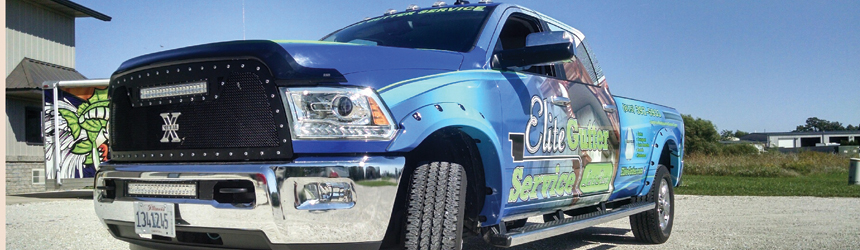
Above: Road Rage Design digitally printed the wrap for a Ram pickup truck with Avery Dennison MPI 1105 digital film and Avery Dennison MPI 2528 window perforation film.

Practical, Yet Impactful
A vehicle wrap can be completed with perforated window media, which includes a perforation pattern for the first surface graphic image and for seeing out of the second surface. The media enables UV protection and privacy, while also displaying an image that allows for viewing.

In some scenarios, traditional window graphics are used for vehicle advertisements but if the vehicle is wrapped, the design looks more completed on the windows rather than a separate graphic. “Another side benefit with perforated window media is it blocks most of the sunlight so that the car’s interior doesn’t heat up as much,” admits Louie Calma, technical specialist, Arlon Graphics, LLC.

Paired with a vehicle wrap, perforated window media completely covers the vehicle for a transformational impact. “The brand message seamlessly envelops the vehicle,” says Steve Tomas, director, product branding business team, FLEXcon. A larger advertising canvas increases flexibility of the brand’s message and offers added creative content.

Perforated window media is also available in reflective finishes for driving at night. According to Tomas, the reflectivity of the graphics in areas with low light provides better viewing of the graphics without minimizing visibility for drivers or passengers looking from the inside out.

Picking a Pattern
Standard perforation patterns consist of 50/50, 50/40, and 65/35 with the first number representing the print coverage and the second number the visual light transmission (VLT). VLT is the measurable amount of solar visible light that travels through a glazing system. A lower VLT window restricts how much light enters while a high VLT allows daylight to pass through.

Marcel Medved, business development director, Continental Grafix USA, Inc., believes passenger cars generally use 50/50 while buses use 50/50 and 60/40. Commercial delivery vans can use solid material or 80/20 depending if passengers want to see out. “This is based upon comfort for the passenger, the closer you are to the window, the harder it is to see out,” he offers.

“The pattern can be different when applying to commercial/transit vehicles. Consider a city bus, the windows on the sides can be covered with a 60/40 perforated film for greater graphic visibility for advertising—this is because the driver does not use those windows for visibility/safety reasons,” comments Craig Campbell, market manager – graphic innovations, ORAFOL Americas.

According to Jeff Stadelman, graphics marketing manager, Mactac Distributor Products, Mactac recommends the 50/50 pattern with a 1.5 millimeter hole for automotive window wraps. “This pattern allows for a more complete view through the graphic, especially on a slight to moderately curved surface without sacrificing too much of the image,” he explains.

If regulations allow and there is no need for the driver or passenger to see out a particular window, Tomas says a denser pattern can be used for better image quality. “Safety of the vehicle occupants takes precedence over any preference for better image quality. For windows where visibility is not needed at all, consider solid materials rather than perforated,” he adds.

Brenda Thomas, sign and graphics market specialist, Piedmont Plastics, agrees and says that a 50/50 view pattern for rearview windows is typically recommended while regulations for VLT required on vehicle windows vary by state.

“Most or all window perforated manufacturers will tell you that all states have different regulations when it comes to window graphics. The best practice is to consult your state’s Department of Transportation for regulations,” suggests Thomas.

According to Mark Elvester, senior technologist, 3M Commercial Solutions, the 50/50 pattern is required by law in most states and allows the driver to see through it. Additionally, an optically clear overlaminate is necessary to not further sight hindrance. “Laws regarding perforated window media for moving vehicles vary on what areas of a car can be covered and by how much,” he adds. Each country, state, and even city can have different laws for vehicle regulations. It is the print provider’s responsibility to ensure graphics comply with the location’s vehicle regulations.

Reigning in Suitable Graphics
Window graphics are used to draw attention and to achieve that goal, solid bright colors help the graphic pop. “However, when printing on perforated film, the graphic may look good off the printer but can appear washed or faded on the window,” advises Joshua Barnard, product manager, digital print media, Avery Dennison Graphics Solutions.

Additionally, profiles may not be available for the printer, RIP, or media combination. Barnard recommends PSPs research to see if a profile is available for the media intended for the project. “Consult your media provider for available profiles. Also, check with your printer provider and RIP companies as they may also have profiles available for similar media,” he continues.

Calma also suggests PSPs use the correct profile when printing perforated window media. This entails double checking the alignment and placement of the graphic. “Always allow a couple of inches extra around the windows. Avoid a design with a horizontal line for the rear windows because instead of horizontal lines, the window’s curve will make them into an arc,” he explains.

By using an optically clear laminate with the perforated material, the media is easier to handle, scratches are preventable, and stretching and tearing is avoided. According to Barnard, an additional advantage of laminate is keeping the perforated holes clean and easy to see through during installation.

Perforated media intended for latex and UV printing contains holes extending through the original release liner to act as wells to catch ink. Tomas says a solid film or paper cap on the back of the release liner prevents the excess ink from contaminating the backing rollers in the printer.

Keeping Installation on Track
For installation, using an optically clear protective overlaminate helps prevent dirt from being trapped in the perforations. If dirt is trapped, it can drastically reduce the driver’s visibility. “Always cut about one-fourth-of-an-inch away from the edge and use a half-inch sealing lamination tape to prevent the edges from curling,” suggests Calma.

Using water during installation can affect the window media’s clarity. Elvester warns against using water because the perforation pattern forms an air release pattern. Water can be trapped in the perforations, making the graphic blurry and affecting the driver’s visibility.

Tomas agrees and says that wet installation is a poor choice, especially since laminates trap water. He believes lamination is necessary when the perforated media will be exposed to rain. Water collecting in individual holes can aid in lack of ability to see through the product clearly.

“In a moving vehicle, when water gets trapped in the holes, it moves, and this could cause passengers inside the vehicle looking out the window to feel motion sickness,” warns Tomas. It’s also important to consider the window sizes and select the optimal roll width available to reduce waste.

While using a squeegee, it’s important not to apply the squeegee too hard. According to Barnard, applying the squeegee too hard during installation can create a wet look or collapsed holes from the laminate. Instead, use light overlapping squeegee strokes.

“Avoid applying the perforated material over rubber gaskets, as the adhesive will not adhere,” advises Barnard. After trimming, the edges should also be re-squeegeed, and edges can be sealed with edge seal liquid or tape to ensure the graphics adhere for the expected lifespan.

Challenges to Perforation
Perforated window media allows for a certain ratio of printing area and open area. According to Calma, this means the text must be larger to be legible, and if accurate, the colors need to be more vivid to match the vehicle wrap’s color. It’s important that perforated window media complements the vehicle wrap’s design and style, otherwise the vehicle’s transformation won’t be as cohesive.

One of the main challenges of printing graphics on perforated window material is that 50 percent of the print area is missing. For the window graphic to match the rest of the vehicle wrap, Elvester suggests enhancing the color densities of the perforated material to compensate for the missing area.

During installation, curved windows generally require a certain approach to avoid overstretching the graphic. “If it is laminated, some may see squeegee marks, but this should go away over time,” advises Calma. Curved windows also pose risks for wrinkling or adhesion problems if not installed properly.

“If the window has any curve or shape in any way, it is important that a conformable laminate be used. If a polyester laminate is used on a curved surface, it will cause the graphic to tunnel from the edges of the window, thus causing a failure,” cautions Campbell.

Stadelman says that the holes on perforated window media are filled in with the intention to look through them. Installation for perforated window media is similar to normal vinyl graphics, however, he suggests starting the application in the middle of the window and working out towards the curves.

According to Tomas, removal is sometimes be more important than installation and presents its own challenges. “Selecting a perforated material with the correct strength minimizes the potential for breakup and tearing of the graphic on removal,” he says. This can minimize or eliminate adhesive residue on the windows during removal.

Perforated Window Media
Perforated window media is not only used on personal vehicles but also bus, train, and subway wraps, offering brands and marketers more space to make an impact on consumers. For a cohesive full vehicle wrap, perforated window media should blend into the wrap’s design with matching color and style. Before selecting a perforated media type, it’s important to consider the advertising and visibility regulations for moving vehicles based on location and if the perforated media pattern corresponds.

Mar2018, Digital Output

Turning Toward UV

By Melissa Donovan

Roll-to-roll (R2R) printers—and in some cases cut-and-print devices—that use UV or UV LED ink allow print service providers (PSPs) to print to a range of flexible materials. With UV LED, this includes thinner substrates that may melt or become distorted when using a different curing technology. The ability to print to more substrates increases application versatility, leading to new customers and sources of revenue.

Above: Example of backlit applicatoin printed with a Mimaki UV R2R printer.

Demand for It
The demand for UV or UV LED R2R printers derives from a number of influences. A need for faster turnaround times comes as customers request graphics with little lead time. PSPs’ desire to offer applications including backlit and specialty fabric introduces them to new markets like the architectural field; and this is done thanks to UV LED’s ability to print to thin materials.

UV technology in general answers to the demand for instant results. “UV-curable technology can deliver just-in-time turnarounds with instant cure functionality—plus reduced labor, time, and materials costs—resulting in increased productivity and profits. It has matured to a point where the glossiness and instant-cure characteristics that are attractive in both solvent and latex, respectively, have caught up with those two while offering new capabilities. UV-curable technology also offers customers the ability to reduce workflow steps and needed materials, resulting in higher profit margins and reduced turnaround times,” explains Michael Maxwell, senior manager, Mimaki USA, Inc.

With UV beginning on flatbeds, its advancement to R2R was inevitable. “When UV came it was flatbed, then hybrid. The next logical request is ‘I don’t need a flatbed and I don’t need the functionality of a hybrid, I just want a R2R device,’” says Javier Mahmoud, VP of sales and marketing, CET Color.

According to Bill Brouhle, technology center manager, Agfa Graphics, the need to print on thin, flexible, heat sensitive, and fabric materials is what drives PSPs to adopt UV and UV LED R2R technologies. “It comes down to a few big factors like cost, shipping, the time it takes to install, how good it looks backlit or front lit, and how easy and fast it is to get a replacement made and shipped when something gets damaged,” continues Brouhle.

Utilizing thinner, more heat-sensitive materials is commonly requested from new buyers. “Most of this demand is coming from the architectural markets, for creating interior wall graphics as well as exterior graphics on unique materials like Tyvek and other eco-friendly substrates,” shares Jay Roberts, product manager, UV printers, Roland DGA Corporation.

Rick Mitchell, demonstration manager, swissQprint America, agrees. Citing customized interior wall graphics on high-end materials like Type II wallcoverings as commonly requested. “Demand is stemming from the diversity in producing product especially in the interior décor market segment.”

In addition to new markets and materials, there is also the simple need for a PSP to work with one versatile device. “The demand for R2R UV printers comes from the need to consolidate many devices into one and increase capacity along with efficiency. Fewer companies are doing a larger share of the volume in these markets. Because of this development these companies are looking for faster machines that can do the R2R work at a lower cost,” adds Christopher Guyett, sales and marketing coordinator, Durst Image Technology US LLC.

EFI finds that demand stems from latex and solvent customers looking to add UV LED R2R. “Here customers have built up their R2R business on smaller latex and solvent machines and then add an LED printer to economically meet higher volume demands and produce a greater variety of applications,” points out Tomer Ohavi, product marketing manager, EFI.

Rolled in Benefits
For a PSP to partake in new technology, it should offer them some advantages—whether immediately or down the road. UV and UV LED R2R printers provide PSPs with a host of benefits including media versatility.

Owning a R2R device in general—whether UV or not—is advantageous. “A dedicated roll machine is the most cost-effective way to print on flexible media if you have a sufficient volume of this work—events, textiles, billboards, and wallcoverings. The options a R2R printer offers—dual, triple, asymmetrical—allows multiple jobs to be printed simultaneously,” says Guyett.

“A dedicated roll capacity allows a large portion of the work to be directed there and leaves open capacity on the other devices. In many cases, it also creates some redundancy,” agrees Kevin Currier, business development manager, Novus Imaging, an M&R Company.

Specifically in regards to UV and UV LED R2R devices, “you can print on materials that used to be difficult, if not impossible, to print on due to the heat that was output from traditional lamps. The combination of a flexible thin ink technology and cool imaging UV LED R2R printers enables customers to print on materials that are thinner and often cheaper than before, allowing them to keep more money in their pocket,” explains Brouhle.

“The lower cost of operation and maintenance along with a longer bulb life and no warm up or shut down times is also very compelling,” adds Maxwell.

There is also the environmentally friendly element of UV printing. Roberts explains that many end users demand more ecologically friendly materials that cannot be printed on light solvent printers. “UV inkjets can print on a much wider range of substrates than solvent models, and their ability to print on environmentally compatible substrates makes them even more popular,” he continues.

Cost Association
The average price point on a UV or UV LED R2R device ranges. Because of this, a PSP looking at one of these solutions should expect return on investment (ROI) to vary depending on whether it’s a dedicated roll platform or a hybrid, the maximum width of the printer, and other factors.

According to Guyett, the average price point for a dedicated Durst R2R platform ranges from $500,000 to $900,000.

“Depending on the configuration, the list price on a turnkey solution including engine, RIP, workstation, ink and media, startup kit, spectrophotometer, installation, training, profiling, and one year warranty for a UV LED R2R ranges from $200,000 to $400,000,” counters Brouhle.

Roberts points out that the range can be misleading, as there are R2R devices in the $30,000 to $50,000 range intended for first time buyers as well as models in the $200,000 to $300,000 range designed for more industrial use.

“Price point varies, and it often has to do with added features and overall build. There are three- and five-meter wide R2R printers from just under $200,000 all the way up to $600,000 with most being somewhere in the middle of that range,” shares Currier.

For example, without white ink as a feature, Mahmoud says a R2R printer starts at $80,000.

Most vendors agree that ROI is typically between one to two years, however it depends on the applications being output. “Significant ROI can be achieved quickly, especially if the user expands his or her product offerings beyond the ‘me too’ banner market to include personalization and customization as well as finishing services such as sewing, installation, and seam welding,” explains Roberts.

The Apps Have It
UV and UV LED R2R printers’ media compatibility is vast. Likewise is its application versatility. Applications created in conjunction with these devices include traditional retail signage to specialty solutions like wallcoverings and clear films.

Wallcoverings are used in high-end retail spaces, hospitality environments, offices, and the home. They require a quality print. “Wallpaper materials can be very problematic with high heat. UV LED dramatically reduces the amount of heat directed at the material and allows it to be more relaxed when printing. This will produce more consistent results especially in solid tones where inaccurate dot placement can produce poor results,” shares Mitchell.

“Backlit using clear film and specialty textiles are popular examples of applications gaining popularity with UV LED printers. Mainly, the ability to provide vibrant color and eliminate the finishing process associated with other ink types makes these applications popular for these devices,” says David Conrad, director sales and marketing, Mutoh America, Inc.

According to Brouhle, PSPs use UV and UV LED R2R printers to set themselves apart from the competition. “It seems like every account is trying a little something different when combining layering inks on unique substrates in their approach to selling printing. Whether it be using a combination of reflective, holographic, metallic, or optically clear materials in combination with inks, there just doesn’t seem to be a normal or typical customer anymore.”

Ink Flexes
UV ink sets weren’t originally flexible enough to run on R2R printers but improvements to ink chemistries make this now possible.

For example, at Agfa, the company ensures the grinding of its pigments yields fine particulate pigments to maintain a very thin film of ink. The thin film ink technology provides customers with inks that stick to a variety of flexible substrates while simultaneously offering vibrant colors.

Roberts argues that it isn’t so much the ink chemistry but the curing lamps that allow for more flexibility. “UV LED lamp systems cure at a different light wavelength. There were problems with older mercury vapor lamps. While those lamps were very aggressive, they made the inks brittle and less pliable.”

In addition to advancements in ink chemistry, the availability of white ink heightens demand for UV and UV LED R2R devices. “White is popular, for printing on transparent or colored surfaces such as banner materials. The combination of white and color ink adds value to applications utilizing transparent or semi-opaque films. High-opacity white ink also enables blockout printing within a single print, enabling PSPs to easily and efficiently create window graphics viewed differently from either side,” shares Maxwell.

Currier adds that many roll substrates like vinyl can be purchased in colors. This allows the printer to use white to decorate and save money on ink for images that require a flood background of color.

“White UV printing enables high-end, close viewing applications. It creates a competitive advantage in premium signage applications printed on clear, metallic, and colored substrates,” concludes Ohavi.

UV Rolls On
The combination of heat curing and ink technologies make it so that a UV-based device is able to print to thinner, more delicate substrates, eventually used in applications such as wallcoverings, backlit, or other architectural-centered markets. UV and UV LED R2R printers are suitable for any PSP looking to expand its print capabilities.

Mar2018, Digital Output

Accepting the Intangible

By Cassandra Balentine

As cloud-based technologies continue to gain acceptance, wide format print service providers (PSPs) are among those that benefit from collaboration, automation, and accessibility offered by hosted software.

The demand for cloud-based workflow tools accelerates as web-based solutions become commonplace in both personal and professional roles. However, there are still adoption challenges to overcome, in particular security and accessibility concerns. Pricing and culture change are additional considerations.

Acceptance and Demand
The demand for cloud-based solutions is notable across many verticals, and print environments are no exception.

Mark Gallucci, manager, technology and marketing, commercial software, Agfa Graphics, notices increased interest for cloud solutions in the past year or so, both from large and multi-site companies seeking the advantages of a shared cloud platform, and from small firms that wish to minimize infrastructure and technical requirements.

“People want to concentrate on printing and spend less time managing technology,” says Eva Rosen, co-founder/chief of marketing and finance, arifiQ Development. Additionally, workflow developments are being implemented rapidly and cloud-based applications allow users to take advantage of updates immediately if they choose.

Julien Walther, product manager, Caldera, points out that a couple of years ago people were afraid of putting their data somewhere they couldn’t touch. “It is the same revolution we had 30 years ago when people starting putting all the data into a computer without hardcopy prints.”
Initial skepticism of the cloud was gradually replaced by acceptance. “The Software as a Service (SaaS) model has been around for many years, but there were few applications in this particular market. I think that confusion over cloud-enabled local applications, SaaS, and infrastructure as a service concepts made it difficult to get by in in the past,” comments Gallucci.

Cloud-based tools are part of everyday life for many, not just print providers. “The days of installing software on a local machine or server is coming to an end or at least nearly every bit of software will have a part of its functionality in the cloud,” says Ellen Faith Hurwitch, VP, director of operations, the Americas, RedTie, Inc.
Dean Derhak, product director, SA International, also notices a shift in attitude toward cloud-based tools. “Initially, cloud-based software was met with skepticism because it was quite novel and wide format print providers were uncertain of what to expect. Once companies began to witness the business benefits afforded by such software solutions—including web-based customer artwork approval and cloud-based licensing—the industry started to embrace it more enthusiastically.”

For most, the cloud is no longer part of the thought process during the software evaluation. “They don’t think in terms of locally installed or cloud-based software. It is just software, if it works, they are not concerned,” comments Hurwitch.

Derhak agrees, noting that customers tend to focus more on the business benefits that these solutions bring to wide format printers, such as the capability to secure new online business, quote on the road, and obtain rapid artwork approval to help enhance production throughput.

Benefits and Experience
Cloud functionality brings many positives. Automation, collaboration, accessibility, and reduced reliance of IT are all benefits of a cloud-based production workflow.

“Cloud-based solutions have intrinsic benefits that make them attractive to print providers of all sizes,” comments Alex Ravari, VP of operations, PrintMatics. Among these are open accessibility and availability on different devices.

Erik Strik, CEO/founder, Aurelon, notes that as a data-driven activity, print is in a prime position to benefit from the use of cloud-based workflow tools. While the sector is starting to invest in its abilities, adoption is largely fragmented.

Additionally, Walther points out that it reduces the need for IT knowledge and the latest version is always running.

Tony Tarpey, COO, PressWise by SmartSoft, says the cloud allows software manufacturers to deploy updates and enhancements organically and with greater efficiency to its customers. “Response times to feature and enhancement requests are shorter as well,” he offers.

Bryan Manwaring, director of product marketing, Onyx Graphics, Inc., shares that the aspects of workflow solutions most quickly migrating to the cloud are those involving customer interactions such as proofing and online ordering.

“Cloud-based artwork approval tools allow PSPs to sharpen their customer approval 50 percent faster than traditional methods,” admits Derhak. Previously, PSPs would need to email artwork over to their customers for approval, which was more troublesome and less likely to get immediate action from print buyers.

Strik adds that both the automated delivery of jobs and feedback on the results optimize the print process by increasing efficiency and reducing errors. “Without the feedback delivered through cloud-based reporting, it is not possible to calculate the costing of an individual job and therefore not possible to make informed business decisions.”

“Cloud solutions minimize the requirements for on-premise servers and IT services, and software and hardware upgrades,” comments Gallucci.

Ravari says for many smaller companies, it is difficult to maintain the expertise and staff needed to run networks and servers properly. In larger companies, the tendency is to employ an entire IT department, which is expensive and a derailment from the company’s main focus.

Hurwitch says the biggest positive is the ability to spend more time doing what is best for the business and less time maintaining software and hardware. “It has lowered the cost of entry to getting software too,” she states.

Strik believes the next challenge is to deepen integration to all aspects of the print workflow, incorporating automation into the process. “This is the stage that will really revolutionize wide format print forever—and for the better.”

Challenges and Concerns
While cloud acceptance has improved, many are still hesitant. This makes company culture one of the biggest challenges for a cloud-based production workflow. Security, storage, and accessibility are additional concerns.

Committing to the cloud is committing to the unknown for most wide format PSPs. Strik says the primary objections can mainly be found on the shop floors. “Staff can often be reluctant to fully embrace new systems, which hinders the effectiveness of more advanced systems,” he explains. “Part of the problem is that although technology has progressed hugely within the last two decades, mindsets invariably have not—or at least print shop owners still need to be convinced of the benefits of cloud-based technology. Moving forward will rely more upon a meeting of minds with a desire for change and the right platform to enable this change.”

Gallucci feels that success depends at least as much upon how the solution is implemented and used, as it does upon the product itself. If employees won’t use the workflow tools, or customers don’t order from the web store, it won’t be a success. It’s important to have a champion and evangelist to drive adoption,” he admits.

PSPs also have a tendency to only incorporate parts of the workflow process to the cloud. “For example, the may entrust the cloud to take care of the procedures for estimation, booking in and production, but often do not fully connect the dots—specifically, linking in their RIPs to the cloud. This means they are losing out on realizing the full productivity and efficiency benefits,” explains Strik. However, with the most sophisticated systems now offering powerful linking tools to the cloud, all IT support teams need to do is glue the systems together, making the step towards full automation easier to swallow.”

Security concerns are a common barrier of adoption. According to Manwaring, data protection and data sovereignty are two of the biggest challenges from customers looking at cloud-based technologies for their workflow solution.

Derhak says PSPs don’t want competitors to access their data.

Strik believes cloud security concerns are largely unfounded. “In many ways, data entrusted to the cloud is safer and more accessible,” he argues. “For example, in the event of a disaster recovery situation—as data is automatically backed up to the cloud—a print shop with cloud-based storage can get back on its feet much quicker.”

The downside to cloud-based solutions includes the possibility that internet outages make the system inaccessible, which can impact or even stop production.

Gallucci says that availability and uptime are frequent concerns with cloud-based systems, as well as the reliability of the provider. “If an essential workflow or business service is shut off with little or no notice, the effects could be devastating,” he admits.

Derhak agrees, adding that print businesses require good internet connectivity to each workstation accessing the cloud-based tools. “In the past, this would have proved problematic for some, but with greater internet accessibility this issue is now virtually irrelevant,” he insists.

Ravari sees an issue with many cloud-based workflow solutions being restrictive with less sophisticated user interfaces. “This is an important factor in software design that can have an enormous impact on flow, trainability, and proper implementation of necessary tools. Some of today’s software—even though possibly feature rich—are difficult to operate and learn. Because of major limitations of the user interface, every operation requires a jumping around into different tabs and fields and more often than not users are facing tools that are maimed by this fundamental weakness.”

Flexible Pricing
Cloud-based solutions are often advantageous compared with on-premise options in terms of pricing. Depending on the provider and the buyer, pricing options range from monthly to annual, or even per use.

Walther says there are no rules when it comes to pricing. “I would say this is cultural,” adding that different geographies have varying preferences. It is also dependent on the company.

Cloud-based workflows don’t have to be expensive, and the cost savings in time, ink, and media, more than make up for the initial investment, admits Strik.

When moving from traditional, locally installed software to the cloud, the biggest concern is moving from buying software outright to licensing software on a monthly basis. “People often worry about the ongoing costs of cloud-based fees, but not about the ongoing costs of installed software. Installed software needs maintaining and updating and that incurs costs by needing internal resources or an external maintenance cost and often both. You also have to buy outright major version changes if you need the new features. Not to mention that new versions will eventually need new hardware. If people actually compared like for like over the lifetime of using the software, they would see that it is very cost effective to use cloud-based solutions,” he continues.

“PSPs looking to minimize upfront transaction costs and mitigate risk of implementing new technologies may prefer the option of a monthly subscription over yearly or turnkey transactions. We find that trial periods help overcome this obstacle of risk so that PSPs can enjoy the reduced cost of annual subscriptions,” recommends Manwaring.

“The pay-as-you-go model can be particularly appealing to wide format print shops. Companies often opt for this payment model as it offers automatic updates and flexibility to increase or decrease the price they pay according to the needs of their business,” suggests Strik.

Hurwitch says many subscriptions are monthly or quarterly for a minimum term. “The biggest advantage is spreading costs out, which helps with cash flow and more closely matches income with outgoing.” She does see a number of software vendors opting for an annual subscription business model.

Tarpey notes monthly subscriptions are the preferred method of payment for PressWise wide format customers. “Upfront costs are much lower with a SaaS model, and we never charge upgrade fees when a new version is released,” he explains. This means customers always have access to the latest tools and features. “They also prefer the freedom of not being locked into an expensive system should they decide its not right for them.”

Many workflow solutions require significant implementation and training, and in many cases a month-to-month license doesn’t make sense. In these cases, an annual commitment, billed monthly or as a lump sum is a widely accepted model, explains Gallucci.

On-Premise Solutions
While there are many advantages to cloud-based workflows, there are also reasons print providers still demand on-premise solutions.

“The cloud is all about connecting things together,” shares Manwaring. “Cloud technologies are naturally suited to integrating and connecting workflow pieces. However, the cloud is not without its challenges. We find customers hesitant or not even allowed by contract to put customer information and artwork in the cloud. While it may provide easy access to those in a shop, we find customers would still prefer to keep their production systems on premise.”

“RIPped jobs for wide and grand format print engines can be enormous, and it generally makes sense to have that part of the workflow on premise. But even for processes that are easily migrated to the cloud, an on-premise solution may be preferred if a company is unable to get reliable internet access, or simply prefers having everything under their roof,” admits Gallucci.

Tarpey says sometimes a customer or prospect requests to self host for greater control over their server. “We can accommodate such a request through the setup of what we call a virtual private cloud within their facility,” he offers. This type of customer is typically larger with access to IT resources—a luxury he says many small- to medium-sized printers do not have.

To the Cloud
Print providers once reluctant to move to a cloud-based production workflow have opted to make the transition in favor of the advantages it provides. While there are still concerns about security and accessibility, apprehension is on the decline as more technologies move to the cloud.

Mar2018, Digital Output

Practical Performance

By Melissa Donovan

Improvements in printhead design drive the industry forward. Wide format printers deliver productivity as well as efficiency, and the printheads found under the hood help achieve this. Two categories of printheads are used in wide format printing—piezoelectric and thermal. Manufacturers are devout when it comes to researching how to prolong the life of both types of printheads with the goal of creating a number of robust products that can even withstand entry into the printing of industrial-type applications.

Above: The Si-MEMS architecture in the Xaar 1201 printhead enables all 1,280 nozzles to fire 2.5 picoliters at eight gray levels.

Advancing Wide Format
Printhead technology directly affects the advancement of wide format digital printing. The newest iterations give print service providers (PSPs) more flexibility in terms of time, cost, and services offered.

It’s a symbiotic relationship. “PSPs look for expanded product offerings, which leads to a higher demand in the performance of the printheads in wide format printers,” says Matt McCausland, product manager, professional imaging, Epson.

“High-quality images are achieved from less passes, using various ink types, using only two to four printheads, and all at faster speeds giving more throughput. It’s like a second digital revolution has been kick started by piezoelectric inkjet silicon MicroElectroMechanical Systems (MEMS) technology,” explains Simon Kirk, senior product manager, Xaar plc.
Fujifilm North America Corporation defines silicon MEMS (Si-MEMS) as a proprietary fabrication technology based on semiconductor manufacturing techniques. According to the company, this technology combines with drop on demand piezoelectric micro-fluidic pumping in a single monolithic structure with sub-micron accuracy.

John Harman, business development manager, industrial inkjet, Ricoh Company Ltd., points specifically to Ricoh’s addition of flow-through capability, which provides advancements in heightened serviceability for wide format printers, resulting in increased productivity.

Prolonging the Printhead
A printhead should be developed with a long lasting timeframe in mind. Manufacturers focus on specific materials like steel to provide a level of indestructability. On the other side of the spectrum, PSPs need to be apprised of proper upkeep to maintain the level of performance expected of the printhead.

“Manufacturers have focused on printhead robustness over the past few years,” admits Esteban Marin, director – Printek division, Seiko Instruments USA, Inc. Improvements in chemical compatibility are catching up with the increasing amount of new ink formulations. Robust build materials are used to match the industrial requirements of wide format machines.

One example of a robust build material is a stainless steel printhead construction with a robust metal nozzle plate, according to Harman. “These are increasingly critical for prolonged printhead life as there are significant increases in wide format print volumes,” he continues.

“Advancements in the process for manufacturing thermal inkjet printheads allow for a much larger number of print nozzles on a printhead than in the past. The overall cost per nozzle is very small and nozzle redundancy can therefore easily be implemented prolonging the overall life of the printhead and increasing the image quality,” shares Gianluigi Rankin, director product marketing, Memjet.

Once on a shop floor, printheads must be monitored by the PSP. “A good maintenance station that includes capping, automated cleaning, and spitting areas ensures you can cater to all the requirements of a printhead—purging, clearing of nozzles, and maintenance of the meniscus. Also, working with a reputable and capable integrator will make all the difference in how the printhead is managed, maintained, and run so you can optimize printhead life,” shares Kirk.

“The biggest factor in the life of a printhead is continued maintenance—it is important to make sure they are clean of any fibers, hair, or debris. Print shops are oftentimes not the neatest environments, so it is important to be conscious of where a printer is placed in the shop to limit external dust/debris generated from finishing equipment,” agrees McCausland.

Besides continued maintenance, using the correct ink can ensure the life of a printhead. “Ink definitely plays a factor. Inkjet ink is a highly engineered product and a small change to the formulation of the ink for a thermal inkjet can have a significant impact on the life of the printhead. That change can alter the way the ink reacts with the inkjet chamber and heating element, and reduce the overall printhead life,” says Rankin.

“As a general principle, the longest printhead life will be obtained when printheads and ink are store, handled, and used in accordance with the manufacturer’s guidelines and use by dates, and when equipment is maintained and operated according to recommended practices and maintenance schedules in the operator and service manuals,” recommends Dr. Ross Allen, senior technical specialist, inkjet technology platforms, HP, Inc.

Quality and Productivity
Features that print providers expect from their print engine include high image quality and productivity at low running costs. Printheads contribute to this.

“Each evolution of printhead technology pushes the envelope in terms of what is possible. Innovations like variable-sized droplet technology and improvements to micro-weaves allow print providers greater flexibility in product offerings and differentiation,” explains McCausland.

According to Kirk, the technology found in the Xaar 1201 printhead is an excellent example of achieving both quality and productivity. The Si-MEMS architecture in this particular printhead enables all 1,280 nozzles to fire 2.5 picoliters at eight gray levels, up to 30 kHz, achieving 1,200 dpi or higher from a low number of passes. “This combination of features, enabled by Si-MEMS technology, gives high-resolution images at high speed on multiple substrate types,” he continues.

“As a printhead manufacturer incorporating features including flow through, higher jetting frequencies, and higher temperature handling capabilities will increase the bandwidth for the OEM printer manufacturer to deliver higher image quality and increased productivity at lower running costs,” shares Harman.

Allen adds that a printhead offering low cost per nozzle can employ more nozzles to achieve higher productivity as well as feature nozzle redundancy, which hides nozzle errors.

Response to Industrial
With the advent of industrial-type applications, printheads need to be even more robust. Printhead manufacturers respond to this in their own individual ways.

Epson believes robustness is the inherent benefit of its PrecisionCore thin film piezo (TFP) printhead technology. It has the ability to run a variety of different ink chemistries through the printheads with high reliability and consistency.

Inks used in HP PageWide printers are formulated for longer decap times, or exposure to air without printing. This directly contributes to printhead robustness. “Inside the printhead, inks are circulated to keep them fresh in the drop generators between printing drops. This feature, called microcircluation, is enabled by the high density of active elements provided by HP Thermal Inkjet technology,” explains Allen.

“At Memjet, we have drawn from our past experience in applications like corrugated board and commercial printing and made improvements that make our printhead technology even better suited for a lot of industrial applications. We see a lot of interest from companies outside of our current market segments,” shares Rankin.

Ricoh addresses the advent of industrial applications with its stainless steel printhead construction. In addition, printhead flow-through capabilities enable a more robust industrial print solution, according to Harman.

Seiko creates its printheads so they are capable of sustaining the harshest environments. Some of the most recent developments in printhead manufacturing include integrating stronger materials for the nozzle plate and water-resistant printhead designs. Both are in response to industrial applications.

At Xaar, the company focuses on three primary features of its Xaar 1201 printhead to ensure its robustness holds up in varied printing environments. A nozzle guard surrounds the nozzle plate and ensures protection from low-level media crashes. The printhead is cable of jetting solvent, eco-solvent, aqueous, or UV ink. An elevated electrical connection cover protects the electrical connection from ink splashes.

Printheads for Sale
Here are some of the newest printheads or advancements to existing models in the wide format space. These include both piezoelectric and thermal technologies.

Epson PrecisionCore TFP printheads include 360 nozzles per channel and variable-sized droplet technology as small as 4.2 picoliters. They are compatible with aqueous, solvent, resin, and UV-curable ink types. The technology scales from Epson’s desktop devices to its wide format printers and label presses.

Fujifilm Dimatix’s Samba GMA is a compact, low voltage, full Si-MEMS printhead designed for scanning applications such as textile, indoor signage, soft signage, and high-quality UV printing. With 384 individually addressable nozzles, the Samba GMA 33 printhead features a native 300 dpi resolution and a native ink drop size of five picoliters delivering outstanding print quality that jets a range of fluids including UV-curable, solvent, and aqueous inks.

HP offers a 4.25-inch printhead that powers its HP PageWide presses and HP Latex 1500 and 3000 Series printers. The standard version of the printhead has 10,560 single drop weight nozzles, while the HDNA version features 21,120 nozzles with 10,560 each of low and high drop weights. The printhead uses five HP Thermal Inkjet chips in a staggered and overlapping configuration to produce the 4.25-inch print swath.

Memjet’s new DuraLink technology uses aqueous pigment inks for higher durability prints. The product promotes a longer printhead life as well. The DuraLink printhead features a 1,600 dpi native resolution, 8.77-inch width, 70,400 nozzles, and five times nozzle redundancy. It produces 2.2 picoliters drops up to the recommended maximum nozzle firing frequency of 15.5 kHz.

Ricoh MH5421 F/MF printheads are an extension of the MH5420 family. They offer printhead flow-through capability for both high and low viscosity inks. This enables improved handling of heavy loaded inks and improved control of ink jetting temperatures. In addition, the company recently launched the MH5421 to offer improved compatibility with aqueous ink.

Seiko offers the RC1536, its latest recirculation printhead, which sets standards for new developments capable of jetting at higher frequencies while moving the ink through the printhead. The RC1536 is available in two models—M and L—and is considered one of the top printheads in ceramics, high ink deposition, and inline white printing, according to the company.

Xaar’s 5601 printhead has been in development for seven years. It uses Xaar Thin Film Piezo Silicon MEMS technology, which provides a high resolution with over 5,600 nozzles capable of jetting up to eight liters of fluid per hour. AcuDrp Technology controls greyscale drop ejection, yielding perfect image quality. TF Technology maximizes production uptime, print quality, and lifetime. Crafted with a Z profile, multiple printheads fit closely together, which offers compact print zones, accurate drop placement, and reduced costs in association with accurate media control and positioning. The Xaar 5601 is optimized for aqueous ink and is ideal for textiles, laminates, commercial printing, and packaging applications.

Printheads in Action
The perfect marriage of a printhead and a wide format printer/ink leads the way for endless uses when it comes to digital printing. Today’s print hardware is equipped with robust printheads that allow for almost anything to be digitally printed on. In addition, the printheads are designed to offer high productivity with a prolonged life.

Mar2018, Digital Output

Expanding Print Horizons

By Olivia Cahoon

Print service providers (PSPs) that launch into unfamiliar territory with services like digital textile printing for home décor or wallcoverings for architectural firms should plan on experiencing some learning curves. While adapting to a new production process is important, it’s also integral that PSPs learn how to cater to specialty customers and their unfamiliar demands. Focusing on communication and fully understanding the application as well as the customer’s expectations are important considerations.

Above: Utilizing wide format printers from Mimaki, PSPs can enter into decor printing for both residential and office spaces, creating applications like this sublimated glass piece.

Expanded Offerings
As digital print technology continues to advance, PSPs take advantage of the newest innovations and expand into specialty applications. By entering markets like digital textile printing and wallcoverings, PSPs provide a fuller branding opportunity to current clients in addition to a new revenue source for custom and commercial items.

“Adding the ability to produce décor items like custom wallpaper and fabrics for office spaces and architectural applications expands the sign shop’s ability to provide more complex branding for customers,” explains Randy Anderson, product manager, dye-sublimation (dye-sub) and direct to textile printer line, Mutoh America, Inc.

Not only do PSPs expand their offerings to existing customers, they also open the door for new clients who primarily seek specialty applications. For example, digital textile printing for soft signage is a growing market that attracts retailers and brand managers. “It can be used to produce wind sails, dancers, and other attention-grabbing applications that are also easy to handle and more economical to ship,” says Michael Maxwell, senior manager, Mimaki USA, Inc.

With more services and applications to offer, PSPs increase profit margins while diversifying themselves from competition. According to Jessica Blevins, applications product specialist, S-One Holdings Corporation, PSPs can also increase their prices and charge more for customized solutions.

Tom Wittenberg, large format marketing segment manager, sign and décor, the Americas, HP, Inc., says PSPs who offer specialty applications should think of the benefits like a financial portfolio. With added capabilities, they can diversify to cover risks in primary holdings.

“In this case, if signage drops, you have textiles and décor to fall back on for business and vice versa,” shares Wittenberg. This includes providing other avenues for growth and margin to allow for faster reinvestment in the business. Additionally, it offers new creative outlets for the PSP’s designers.

Meeting Traditional Demands
Traditional sign buyers seek print providers that offer one-stop shop capabilities with a variety of services and products from printed materials and frames, to specialty inks like neon. At the same time, customers seek the newest sign products and trends to stay ahead of the competition.

“By being able to incorporate printed images on vinyl, banner, backlit film, or other types of flexible media into traditional sign design ensures the sign shop keeps the customer from sourcing your competitors,” recommends Anderson.

Specialty applications for digital textile printing and wallcoverings for office spaces are primarily used indoors while a large amount of signage is intended for outdoor usage. As a result, traditional sign buyers generally have a stronger focus on finishing requirements and price rather than quality. “For example, hems need to be reinforced with webbing for outdoor building signage or an anti-graffiti overlaminate might be specified for added surface protection,” adds Blevins.

Specialty Customer Demands
Specialty customers seeking home décor applications are primarily focused on quality. This is due to the fact that the application will serve as a decorative purpose or to invoke a specific response in an enclosed surrounding.

According to Blevins, home décor customers pay specific attention to textures, how the material feels, color gamut, and the quality of materials and prints. “The buyer might also be attracted to unique product offerings and capabilities to add to or diversify their design,” she explains. Materials for home décor range from fabrics, canvas, and wallcoverings to acrylic, metal, and wood.

Specialty customers also look at quality, turnaround times, pricing, material advice, and design work. “I’ve found that changes in scope and specifications are quite common, much more than the normal, traditional businesses that PSPs work with on a daily basis,” says Wittenberg. End user driven changes are also more common with specialty customers and can drive costs up and margins down. “This can occur to the point of the job being a money losing proposition if you are not managing the customers and your processes very tightly.”

Demands and needs for specialty customers differ from traditional sign buyers. Generally, specialty customers are more interested in appearance because the application is dependent on customization. According to Anderson, specialty customers may be more particular about design, fit, and finish because specialty printing services are typically more expensive than traditional signs that incorporate digital printing. “Customers want the best bang for the buck and they need it when they want it and it has to withstand the site location forever,” he explains.

Home décor and fashion applications tend to involve entirely different types of consumers and challenges. Because there are several types of materials and inks available, Anderson believes it’s important to dial in the appropriate type of material with the appropriate ink and the finishing techniques to ensure the end result is what the customer wants.

Customer Service Approaches
PSPs beginning to offer new specialty services should provide customers with a clear understanding of the application and its terms.

According to Anderson, terms for describing textile applications can differ from traditional signage. For example, the contrast between woven and weave, the different types of weaves, and characteristics of fabric types are all specifications that customers will expect the PSP to be familiar with.

“Listen very carefully to your customer as there are usually special instructions, more than you would have with your traditional buyers,” suggests Wittenberg. This includes being actively involved in the design and decision-making process, which can result in reducing costs and providing ease.

PSPs should approach specialty services by identifying what application they would like to produce and then selecting the best printing process for the project. Once the application is identified, printing methods become easier to navigate with specially matched printers and ink systems that include features for quality, reliability, and value. “Working with an established dealer with knowledge in all areas—including printing, media, inks, finishing, and operations—will help PSPs decide which new specialty markets to tackle,” says Maxwell. Attending leading trade shows will also helps PSPs learn about new applications for existing equipment and new technologies.

If soft signage is the PSP’s intended specialty application, Maxwell believes the next step is to work with a knowledgeable dealer that specializes in all aspects of digital textile technology. This includes several considerations including printers, inks, transfer media, and heat presses or other finishing devices.

“For the best results, a dealer should be selling the inks matched to the printer by the manufacturer,” says Maxwell. In addition, he believes dealers should also be able to work with the PSP to select the best solution based on specific needs, provide information on cost, value, and ROI, and continually service the shop by providing consumables and assistance.

Parallax Digital
Established in 1994, Parallax Digital Studios, Inc. started as a design agency in Atlanta, GA. With six employees, the company originally offered creative, design, and photography services from a 10,000 square foot space.

“This gave us a distinct advantage by providing our customers with a more complete set of services,” says David E. Clevenger, president, Parallax Digital.

Today, it has 49 employees and offers home décor items, expanding from the traditional sign business. Printing services for retail, corporate, exhibit, photographic, and giclée industries occur in a 60,000 square foot workspace. This includes signage, design, and fabricating divisions including in-house paint services.

The PSP also has an ecommerce group, interiorink.com, which offers select interior décor products like murals, custom wallcoverings, fabrics, solar shades, and fine art prints. “We began working in the décor space several years ago and continue to see a very nice upward trend in that business sector,” says Clevenger.

Parallax Digital offers signage including LED systems, fabric, and frames for reflective and backlit applications. According to Clevenger, the shop produces a majority of interior décor in the home, corporate, and display markets.

15 percent of the company’s work is digitally printed home décor with 25 percent in the business-to-business market. “We see the décor markets growing far faster than traditional signage markets with the exception of soft or fabric signage,” points out Clevenger.

The company has three HP Latex 3500 printers, two MS Printing Solutions Impres 4320 dye-sub printers, and an MTEX Solutions Blue inline sublimation device. “We pride ourselves on offering the latest materials and products with state-of-the-art production processes to provide customers with a one-stop, turnkey solution for signage or décor,” shares Clevenger.

Parallax Digital produces custom size products printed to meet the customer’s needs. According to Clevenger, the traditional customer for signage tends to be a professional buyer or facilitator while most of the home décor buyers are do it yourself customers buying for personal projects.

To cater to new types of clients, Clevenger believes the experience needs to work for the customer as seamlessly as possible. “It’s been a process to understand the market and to tailor a solution that meets customer needs without a lot of complexity or frustration,” he admits.

This includes developing the proper tools and platform. “We have dedicated customer service providers with specific knowledge and training to ensure the customer has the help and attention to make their order with us a pleasant and successful experience.”

For PSPs beginning to offer services like digital textile printing for home décor or wallcoverings, Clevenger suggests they start small with one or two core services. Once mastering a specialty application and developing customer experience, the PSP can then determine if and when adding other products or services will be the next step in the business model.

Satisfaction Guaranteed
Expanding beyond traditional signage into specialty applications provides a fuller branding opportunity for new and existing clients. To effectively serve specialty customers, it’s important that PSPs are aware of the customer’s demands and expectations. Specialty customers are generally more particular about appearance and design because these services are generally targeted toward customization with higher costs.

Mar2018, Digital Output